> ## Documentation Index
> Fetch the complete documentation index at: https://docs.bellabooking.com/llms.txt
> Use this file to discover all available pages before exploring further.
# Bella AI Assistant
> Ask questions about your schedule, clients, team, and business performance using natural language
## Introduction
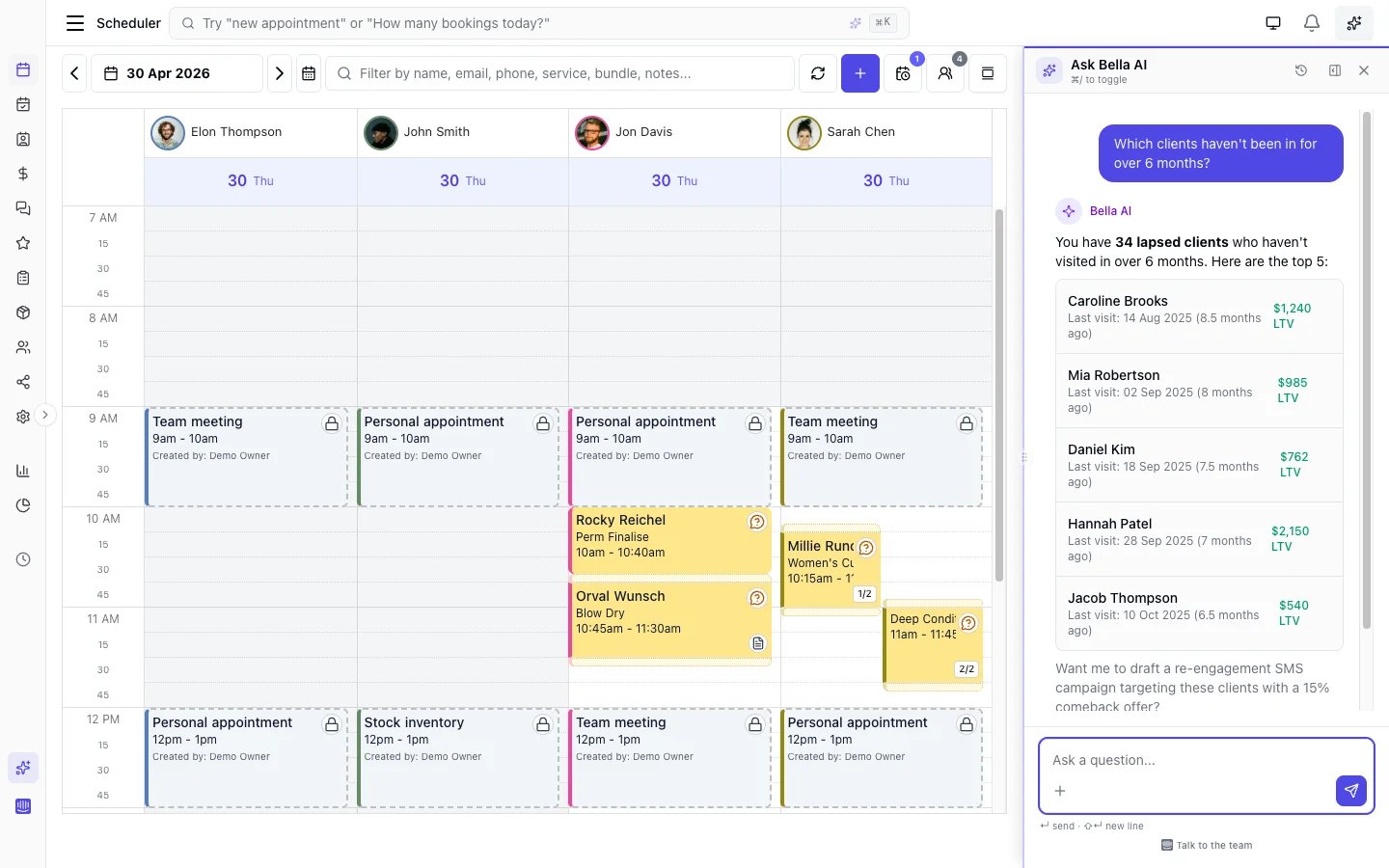
**Bella AI** is an intelligent assistant built into your Bella Booking dashboard. Ask questions in natural language about your appointments, clients, team schedules, sales, and more — and get instant, accurate answers drawn from your live business data.
Bella AI is available on **all plans**.
***
## What you can ask
Bella AI can answer questions across your entire business:
### Appointments
* "What appointments do I have today?"
* "Show me tomorrow's schedule for Sarah"
* "Are there any unconfirmed appointments this week?"
* "How many no-shows did we have this month?"
### Clients
* "Who are our top clients by total spend?"
* "Show me the appointment history for Jane Smith"
* "Which clients have the most cancellations?"
* "When was this client's last visit?"
### Team
* "Who's working today?"
* "What's each team member's utilisation this week?"
* "Does Sarah have availability on Friday?"
* "Who provides which services?"
### Sales & reports
* "What was today's revenue?"
* "Which services generate the most revenue?"
* "Show me a sales breakdown by team member"
* "How many appointments did we complete this month?"
* "Show me a chart of my revenue over the last 30 days"
* "Chart my booked income for the next 6 weeks"
Ask for a **chart** or a **visual overview** — for example "show my revenue trend as a chart" or "compare sales by team member" — and Bella AI draws it right in the chat: a line for a trend, bars for a comparison, or a pie for a share of the whole. Hover any point to see the exact figure in your own currency.
### Settings & how-to
* "How do I set up online booking?"
* "How do I add a new team member?"
* "What are our cancellation policies?"
***
 ## How to use Bella AI
### Opening the assistant
* **Desktop**: Click the **Bella AI** icon in the sidebar, or press **Cmd+/** (Mac) or **Ctrl+/** (Windows/Linux)
* **Mobile**: Tap the Bella AI icon to open a full-screen assistant view
### Asking questions
1. Type your question in the text field
2. Or click one of the **suggested questions** — these change based on the page you are viewing
3. Press Enter or click Send
### Reading responses
* Responses stream in real time so you see results immediately
* Tables, lists, and formatted data render as the response arrives
* Links to pages in the app (clients, appointments, scheduler) are clickable
* You can see which data sources the assistant queried (expandable in the response)
### Managing conversations
* Your conversation history persists during your session
* Click **Clear** to start a fresh conversation
* Closing and reopening the panel preserves your history
***
## Contextual suggestions
Bella AI shows different suggested questions depending on which page you are viewing:
| Page | Example Suggestions |
| ------------- | ---------------------------------------------------------------------------------- |
| **Dashboard** | "What are today's appointments?", "How was business this week?" |
| **Scheduler** | "Show me today's appointments", "Is there availability for a haircut tomorrow?" |
| **Clients** | "Who are our top clients by total spend?", "Which clients have the most no-shows?" |
| **Sales** | "What was today's revenue?", "Which services generate the most revenue?" |
| **Team** | "What's each team member's revenue this year?", "Who provides which services?" |
| **Reports** | Context-specific queries per report type |
| **Settings** | How-to questions like "How do I set up online booking?" |
***
## What Bella AI can and cannot do
### Can do
* Answer questions about your appointments, clients, team, services, products, and sales
* Query real-time data from your business
* Display results as tables, lists, and formatted text
* Draw charts — line, bar, area, or pie — for trends, comparisons, and shares, so you can see the shape of your numbers, not just read them
* Search Bella Booking documentation to answer how-to questions
* Understand your business timezone and display times accordingly
### Feedback & ratings
After any response, you can rate the answer using the thumbs up/down buttons. This feedback helps improve Bella AI's accuracy over time. You can also flag responses that contain incorrect information.
### AI business digest
Bella AI powers the weekly **AI Business Digest** — an automated performance summary delivered to your email and surfaced on the dashboard. The digest analyses your appointments, sales, and client trends, then produces a personalised narrative with highlights, concerns, and actionable insights.
## How to use Bella AI
### Opening the assistant
* **Desktop**: Click the **Bella AI** icon in the sidebar, or press **Cmd+/** (Mac) or **Ctrl+/** (Windows/Linux)
* **Mobile**: Tap the Bella AI icon to open a full-screen assistant view
### Asking questions
1. Type your question in the text field
2. Or click one of the **suggested questions** — these change based on the page you are viewing
3. Press Enter or click Send
### Reading responses
* Responses stream in real time so you see results immediately
* Tables, lists, and formatted data render as the response arrives
* Links to pages in the app (clients, appointments, scheduler) are clickable
* You can see which data sources the assistant queried (expandable in the response)
### Managing conversations
* Your conversation history persists during your session
* Click **Clear** to start a fresh conversation
* Closing and reopening the panel preserves your history
***
## Contextual suggestions
Bella AI shows different suggested questions depending on which page you are viewing:
| Page | Example Suggestions |
| ------------- | ---------------------------------------------------------------------------------- |
| **Dashboard** | "What are today's appointments?", "How was business this week?" |
| **Scheduler** | "Show me today's appointments", "Is there availability for a haircut tomorrow?" |
| **Clients** | "Who are our top clients by total spend?", "Which clients have the most no-shows?" |
| **Sales** | "What was today's revenue?", "Which services generate the most revenue?" |
| **Team** | "What's each team member's revenue this year?", "Who provides which services?" |
| **Reports** | Context-specific queries per report type |
| **Settings** | How-to questions like "How do I set up online booking?" |
***
## What Bella AI can and cannot do
### Can do
* Answer questions about your appointments, clients, team, services, products, and sales
* Query real-time data from your business
* Display results as tables, lists, and formatted text
* Draw charts — line, bar, area, or pie — for trends, comparisons, and shares, so you can see the shape of your numbers, not just read them
* Search Bella Booking documentation to answer how-to questions
* Understand your business timezone and display times accordingly
### Feedback & ratings
After any response, you can rate the answer using the thumbs up/down buttons. This feedback helps improve Bella AI's accuracy over time. You can also flag responses that contain incorrect information.
### AI business digest
Bella AI powers the weekly **AI Business Digest** — an automated performance summary delivered to your email and surfaced on the dashboard. The digest analyses your appointments, sales, and client trends, then produces a personalised narrative with highlights, concerns, and actionable insights.
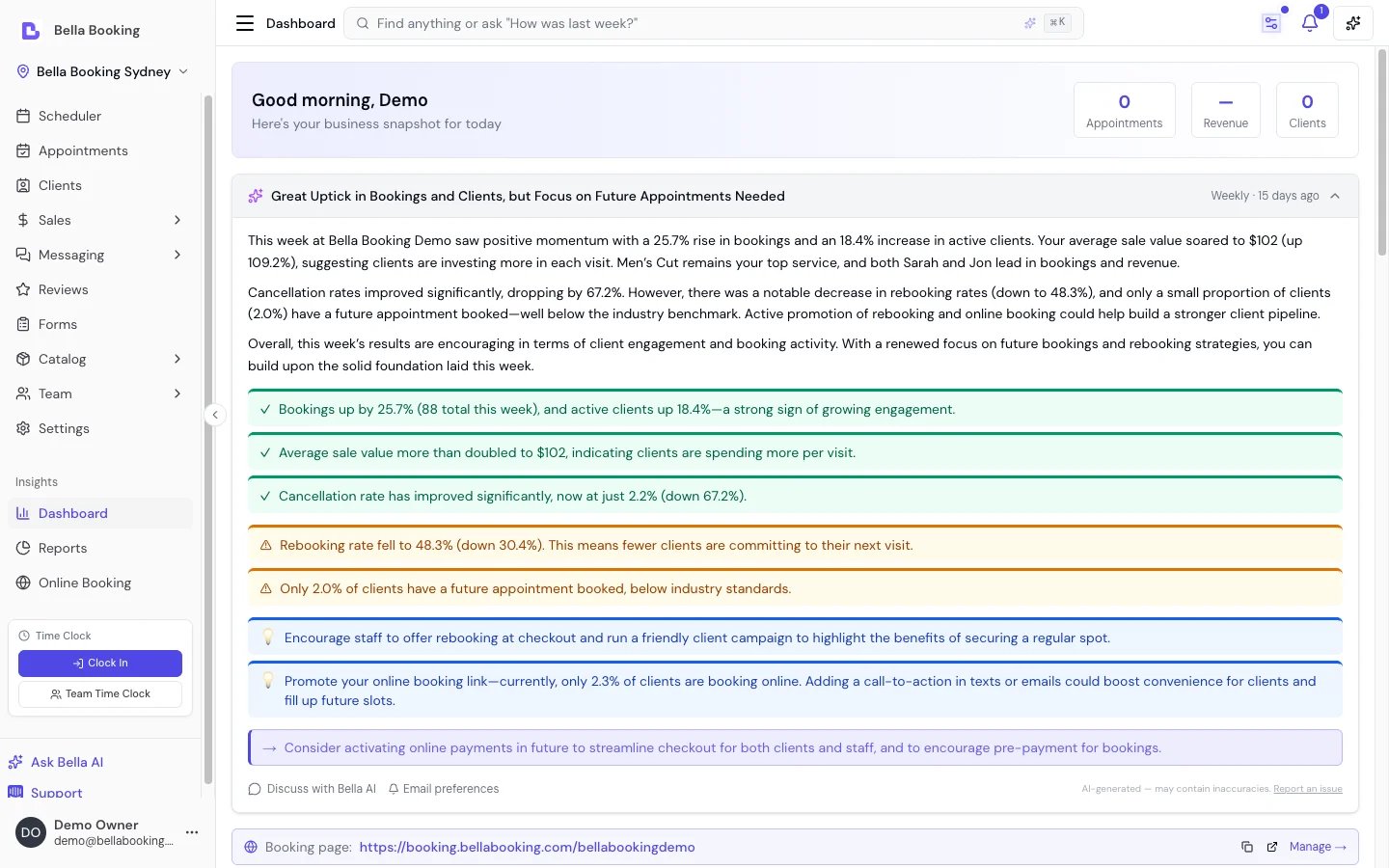 See [Dashboard — AI Business Digest](/insights/dashboard#ai-business-digest-weekly-summary) for details.
### Cannot do (yet)
* Create, modify, or delete appointments, clients, or other records — Bella AI is **read-only**
* Access data from other businesses or external systems
* Process payments or manage billing
***
## Availability
| Plan | Access |
| ---------------- | --------- |
| **Solo** | Available |
| **Starter** | Available |
| **Professional** | Available |
***
## FAQs
**Q: Is Bella AI available on mobile?**
A: Yes. On desktop, Bella AI opens as a resizable side panel. On mobile, it opens as a full-screen view.
**Q: Can Bella AI modify my data?**
A: No. Bella AI is currently read-only. It can answer questions about your data but cannot create, edit, or delete records.
**Q: What data does Bella AI have access to?**
A: Bella AI can query your appointments, clients, team members, services, products, suppliers, sales, reports, and business settings. All queries are scoped to your business.
**Q: Is my data shared with other businesses?**
A: No. Bella AI only accesses data for your business. Conversations are not shared.
**Q: How accurate are the answers?**
A: Bella AI queries your live data directly, so answers reflect the current state of your business. If something doesn't look right, try rephrasing your question or ask for more detail.
**Q: Can Bella AI show me a chart?**
A: Yes. Ask for a chart or a visual overview — for example "show my revenue trend as a chart" or "compare sales by team member" — and Bella AI renders it inline: a line for a trend, bars for a comparison, an area for a running total, or a pie for a share of the whole. It only charts data your reports actually contain, hover any point to read the exact figure in your currency, and for a single number it simply gives you the figure rather than a chart.
See [Dashboard — AI Business Digest](/insights/dashboard#ai-business-digest-weekly-summary) for details.
### Cannot do (yet)
* Create, modify, or delete appointments, clients, or other records — Bella AI is **read-only**
* Access data from other businesses or external systems
* Process payments or manage billing
***
## Availability
| Plan | Access |
| ---------------- | --------- |
| **Solo** | Available |
| **Starter** | Available |
| **Professional** | Available |
***
## FAQs
**Q: Is Bella AI available on mobile?**
A: Yes. On desktop, Bella AI opens as a resizable side panel. On mobile, it opens as a full-screen view.
**Q: Can Bella AI modify my data?**
A: No. Bella AI is currently read-only. It can answer questions about your data but cannot create, edit, or delete records.
**Q: What data does Bella AI have access to?**
A: Bella AI can query your appointments, clients, team members, services, products, suppliers, sales, reports, and business settings. All queries are scoped to your business.
**Q: Is my data shared with other businesses?**
A: No. Bella AI only accesses data for your business. Conversations are not shared.
**Q: How accurate are the answers?**
A: Bella AI queries your live data directly, so answers reflect the current state of your business. If something doesn't look right, try rephrasing your question or ask for more detail.
**Q: Can Bella AI show me a chart?**
A: Yes. Ask for a chart or a visual overview — for example "show my revenue trend as a chart" or "compare sales by team member" — and Bella AI renders it inline: a line for a trend, bars for a comparison, an area for a running total, or a pie for a share of the whole. It only charts data your reports actually contain, hover any point to read the exact figure in your currency, and for a single number it simply gives you the figure rather than a chart.