> ## Documentation Index
> Fetch the complete documentation index at: https://docs.bellabooking.com/llms.txt
> Use this file to discover all available pages before exploring further.
# Pricing Tiers
> Set up tiered pricing to charge different rates based on team member experience and skill level
## Introduction
**Pricing tiers** allow you to charge different prices for the same service based on the team member performing it. This is ideal for businesses where team members have varying levels of experience, seniority, or specialisation. For example, a master stylist might charge more than a junior stylist for the same haircut service.
***
## Key features
* **Multiple Tier Levels**: Create as many pricing tiers as your business needs
* **Team Member Assignment**: Assign each team member to a specific pricing tier
* **Service-Specific Pricing**: Set different tier prices for each service in your catalogue
* **Automatic Price Calculation**: System applies correct pricing based on who's performing the service
* **Flexible structure**: Use tiers for experience levels, specialisations, or any other criteria
* **Revenue Optimisation**: Maximise earnings while offering entry-level pricing options
***
## Understanding pricing tiers
### How it works
1. You create pricing tiers (e.g., Junior, Senior, Master)
2. You assign each team member to a tier
3. For each service, you set different prices per tier
4. When a client books with a specific team member, the system automatically applies that team member's tier pricing
### Common pricing tier structures
**Experience-Based:**
* Junior Stylist
* Stylist
* Senior Stylist
* Master Stylist
**Role-Based:**
* Apprentice
* Professional
* Senior Professional
* Expert
**Specialisation-based:**
* General
* Specialist
* Master Specialist
**Time-Based:**
* New Team Member
* Intermediate (1-2 years)
* Advanced (3-5 years)
* Expert (5+ years)
***
## Step-by-step usage instructions
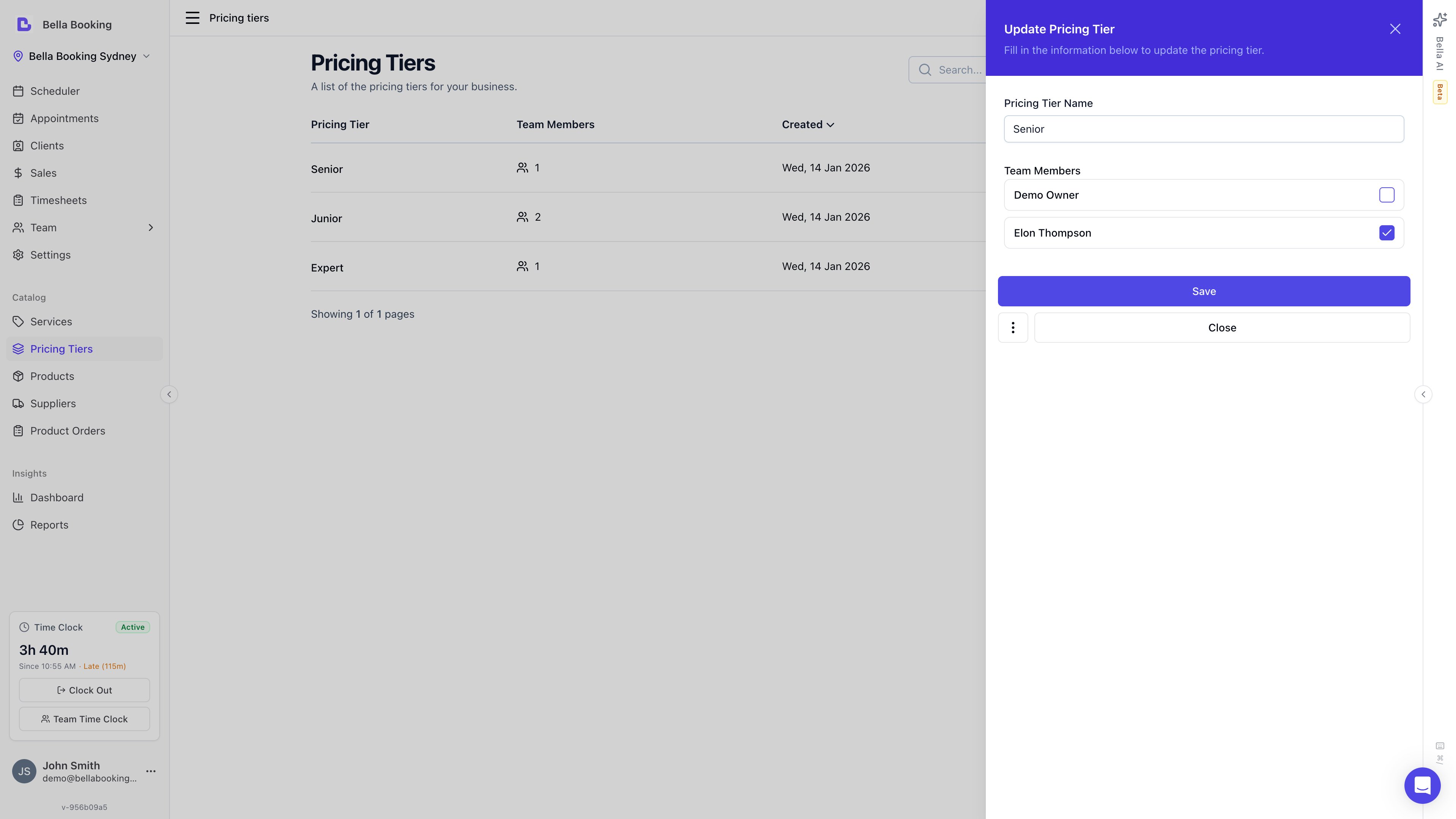 ### Creating a pricing tier
1. Navigate to **Pricing tiers** from the sidebar
2. Click **Add Pricing Tier**
3. Fill in the tier details:
* **Tier name** (required): Descriptive name like "Senior Stylist" or "Master Level"
4. Assign team members from the **Team members** section with checkboxes (Only unassigned team members will be shown)
5. Click **Save**
### Viewing all pricing tiers
1. Go to the **Pricing tiers** section
2. You'll see a list of all your tiers with:
* Tier name
* Number of team members assigned to this tier
### Creating a pricing tier
1. Navigate to **Pricing tiers** from the sidebar
2. Click **Add Pricing Tier**
3. Fill in the tier details:
* **Tier name** (required): Descriptive name like "Senior Stylist" or "Master Level"
4. Assign team members from the **Team members** section with checkboxes (Only unassigned team members will be shown)
5. Click **Save**
### Viewing all pricing tiers
1. Go to the **Pricing tiers** section
2. You'll see a list of all your tiers with:
* Tier name
* Number of team members assigned to this tier
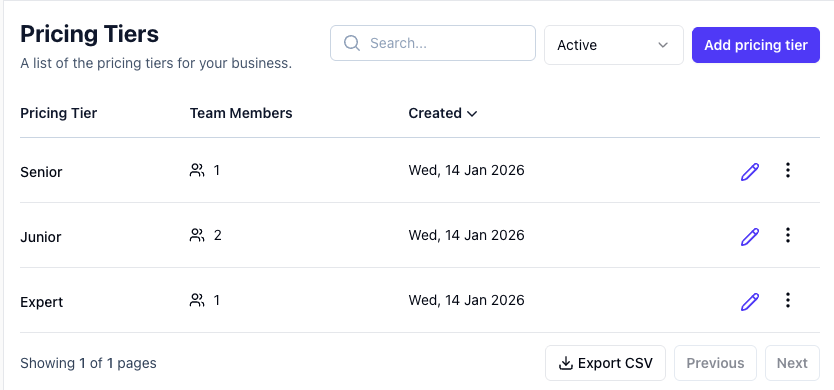 ### Editing a pricing tier
1. Go to the **Pricing tiers** section
2. Find the tier you want to modify
3. Click **Edit** icon
4. Update the name, and change Team members
5. Click **Save**
6. **Note:** Changing the tier name doesn't affect pricing or assignments—it's just a label change
### Archiving a pricing tier
Pricing tiers cannot be deleted directly — they must be archived first.
1. Go to the **Pricing tiers** section
2. Locate the tier in the list
3. Click the **three-dot menu** and select **Archive**
4. Confirm in the dialog
5. **Important Considerations:**
* Team members assigned to this tier will need to be reassigned to another tier
* Services with pricing set for this tier will revert to base pricing
* Ensure you reassign team members before archiving
To restore or permanently delete an archived pricing tier, use the status filter to view archived tiers, then click the three-dot menu and select **Restore** or **Permanently delete**.
***
## Assigning team members to pricing tiers
Each team member should be assigned to a pricing tier that reflects their skill level or role. Team member assignment is done from the Pricing tiers section.
### Assigning team members to a tier
1. Go to the **Pricing tiers** section
2. Click **Edit** on the pricing tier you want to assign team members to
3. In the tier edit form, you'll see a **Team members** section with checkboxes
4. **When creating a new tier**: Only unassigned team members will be shown
5. **When editing an existing tier**: All available team members will be shown
6. Check the boxes next to the team members you want to assign to this tier
7. Click **Save**
**Note:** Each team member can only belong to one pricing tier at a time.
### Changing a team member's pricing tier
To move a team member from one tier to another:
1. Go to the **Pricing tiers** section
2. Edit the tier the team member is currently assigned to
3. Uncheck that team member
4. Save the changes
5. Edit the new tier you want to assign them to
6. Check the team member's checkbox
7. Save the changes
8. **Effect:** All future bookings with this team member will use the new tier's pricing
***
## Setting service prices by tier
After creating tiers and assigning team members, you set tier-specific pricing for each service.
### Editing a pricing tier
1. Go to the **Pricing tiers** section
2. Find the tier you want to modify
3. Click **Edit** icon
4. Update the name, and change Team members
5. Click **Save**
6. **Note:** Changing the tier name doesn't affect pricing or assignments—it's just a label change
### Archiving a pricing tier
Pricing tiers cannot be deleted directly — they must be archived first.
1. Go to the **Pricing tiers** section
2. Locate the tier in the list
3. Click the **three-dot menu** and select **Archive**
4. Confirm in the dialog
5. **Important Considerations:**
* Team members assigned to this tier will need to be reassigned to another tier
* Services with pricing set for this tier will revert to base pricing
* Ensure you reassign team members before archiving
To restore or permanently delete an archived pricing tier, use the status filter to view archived tiers, then click the three-dot menu and select **Restore** or **Permanently delete**.
***
## Assigning team members to pricing tiers
Each team member should be assigned to a pricing tier that reflects their skill level or role. Team member assignment is done from the Pricing tiers section.
### Assigning team members to a tier
1. Go to the **Pricing tiers** section
2. Click **Edit** on the pricing tier you want to assign team members to
3. In the tier edit form, you'll see a **Team members** section with checkboxes
4. **When creating a new tier**: Only unassigned team members will be shown
5. **When editing an existing tier**: All available team members will be shown
6. Check the boxes next to the team members you want to assign to this tier
7. Click **Save**
**Note:** Each team member can only belong to one pricing tier at a time.
### Changing a team member's pricing tier
To move a team member from one tier to another:
1. Go to the **Pricing tiers** section
2. Edit the tier the team member is currently assigned to
3. Uncheck that team member
4. Save the changes
5. Edit the new tier you want to assign them to
6. Check the team member's checkbox
7. Save the changes
8. **Effect:** All future bookings with this team member will use the new tier's pricing
***
## Setting service prices by tier
After creating tiers and assigning team members, you set tier-specific pricing for each service.
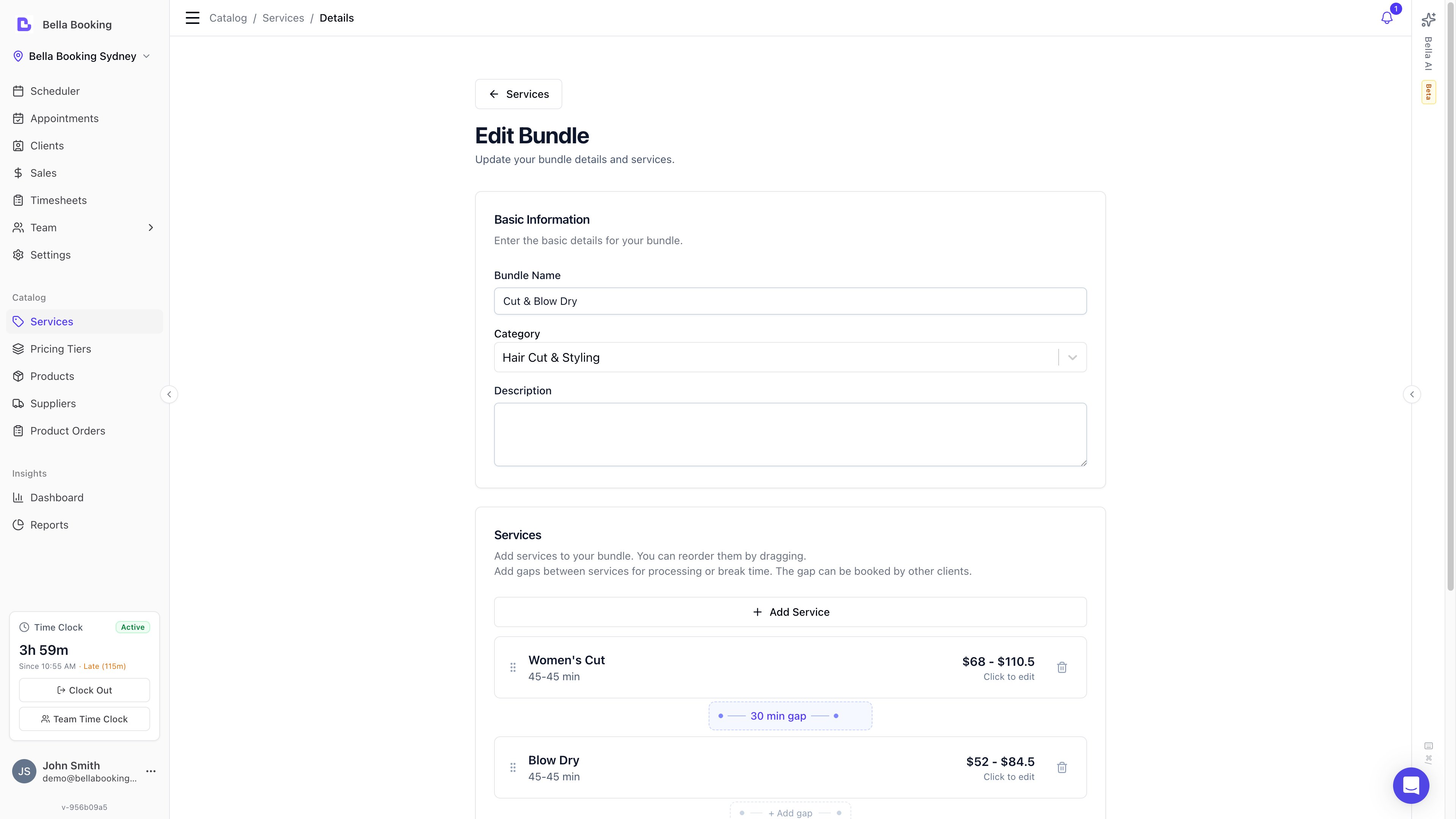 ### Adding tier pricing to a service
1. Go to **Services**
2. Create a new service or edit an existing one
3. Enter the **Price** (this is the default if no tier pricing is set)
4. Enable the **Use pricing tiers** toggle
5. In the **Service pricing tiers** section, you'll see fields for each tier you've created
6. For each tier, enter the price and duration
7. Example for "Women's Haircut":
* Price: \$50
* Junior Tier: \$40
* Senior Tier: \$60
* Master Tier: \$75
8. Click **Save**
***
## How pricing is resolved
When a client books a service with a specific team member, the system resolves the price using this chain (highest priority first):
1. **Pricing tier + variant override** — if the service has variants and the team member's tier has a per-variant price override, that price is used
2. **Variant base price** — if the service has variants but no tier override for that variant, the variant's own price is used
3. **Pricing tier base price** — if the service does not use variants but the team member's tier has a price set, the tier price is used
4. **Service base price** — if none of the above apply, the service's default price is used
The same chain applies to duration.
This means pricing tiers are always optional — if you don't set a tier price for a service, the base price (or variant price) is used as the fallback.
***
## Pricing tiers and service variants
Pricing tiers and [service variants](/service-catalog/variants) work together. They answer different questions:
* **Pricing tiers** answer: *"Who is performing the service?"* — a senior stylist charges more than a junior
* **Service variants** answer: *"What variation of the service is being performed?"* — long hair costs more than short hair
When used together, you get full control over pricing across both dimensions.
### Setting per-variant tier prices
When a service has both pricing tiers and variants enabled:
1. Go to **Services** and open the service
2. On the **Variants** tab, you'll see your variants listed
3. On the **Details** tab with **Use pricing tiers** enabled, each tier shows per-variant price and duration fields
4. Set the price and duration for each tier + variant combination
**Example: "Women's Haircut" with 3 variants and 2 tiers:**
| | Base price | Junior tier | Senior tier |
| --------------- | ---------- | ----------- | ----------- |
| **Short Hair** | \$40 | \$35 | \$50 |
| **Medium Hair** | \$55 | \$48 | \$65 |
| **Long Hair** | \$70 | \$60 | \$85 |
If a client books "Long Hair" with a Senior stylist, the price is **$85**. If they book "Short Hair" with a Junior stylist, the price is **$35**.
Per-variant tier overrides are optional. If you don't set a tier override for a specific variant, the variant's base price is used for team members in that tier.
***
## How tiers appear in booking
### Online booking
When a client selects a team member, the displayed price automatically updates to reflect that team member's pricing tier. Clients see the final price — they do not see tier names or the resolution logic.
### Dashboard (internal booking)
When a team member is selected on the scheduler, the service price updates automatically based on their tier. If the team member is changed, the price recalculates. Team members can still manually override the price if needed.
### Deposits and checkout
Deposit calculations use the tier-resolved price. If a service requires a deposit of 50% and the tier price is $60, the deposit amount is $30 — not 50% of the base price.
***
## Tiers in bundles
When a tier-priced service is used as a component of a [bundle](/service-catalog/bundles), tier pricing still applies to that component line:
* The line resolves to the **assigned team member's tier price and duration** for that service — the same resolution chain as a standalone booking
* If the bundle uses a **fixed total** (or a %-discount), the line's charged amount comes from the bundle's distributed split rather than the tier price, but the tier still sets the component's **duration**
* **Availability sizes the slot for the longest possible tier duration**, so a component never under-books when a slower tier is assigned — the appointment can't overrun into the next slot
Tiers are never a client-facing choice inside a bundle. Which tier applies is derived automatically from the team member assigned to each component.
See [Service Bundles](/service-catalog/bundles) for how a bundle expands into one appointment line per component.
***
## Common use cases
### Experience-based pricing
A hair salon with stylists at different experience levels:
| Tier | Haircut | Colour | Blowdry |
| -------------- | ------- | ------ | ------- |
| Apprentice | \$30 | \$80 | \$25 |
| Stylist | \$45 | \$110 | \$35 |
| Senior Stylist | \$60 | \$140 | \$45 |
| Master Stylist | \$80 | \$180 | \$55 |
### Specialist pricing
A beauty clinic where certain practitioners have specialist qualifications:
| Tier | Facial | Dermal Filler | Skin Consultation |
| ---------------- | ------ | ------------- | ----------------- |
| Therapist | \$90 | — | \$50 |
| Senior Therapist | \$120 | — | \$70 |
| Cosmetic Nurse | \$150 | \$450 | \$90 |
### Combined with variants
A barber shop using both tiers (seniority) and variants (hair length):
| | Short | Medium | Long |
| ------------- | ----- | ------ | ---- |
| Junior Barber | \$25 | \$30 | \$40 |
| Senior Barber | \$35 | \$42 | \$55 |
| Master Barber | \$45 | \$55 | \$70 |
This gives you a full pricing matrix without creating 9 separate services.
***
## FAQs
**Q: Can I assign a team member to multiple pricing tiers?**
A: No. Each team member belongs to one tier at a time.
**Q: What happens to existing appointments when I change a team member's tier?**
A: Existing appointments keep their original pricing. Only new bookings use the updated tier pricing.
**Q: Can I have different tier structures for different service categories?**
A: Typically, no. Pricing tiers are global. However, you can set different tier prices per service, effectively creating custom tier structures.
**Q: Do I have to set tier pricing for every service?**
A: No. If you don't set tier-specific pricing for a service, the system uses the base price for all team members.
**Q: How many pricing tiers should I create?**
A: Most businesses use 2-4 tiers. Too many tiers can confuse clients and complicate management.
**Q: Can I rename a tier without affecting pricing?**
A: Yes. Changing a tier's name is just a label change and doesn't affect any pricing or assignments.
**Q: What if I don't want to use pricing tiers?**
A: Simply don't create any tiers or assign team members to them. Use base pricing for all services and team members.
**Q: How do pricing tiers work with service variants?**
A: They compose together. Each pricing tier can optionally override the price for each variant. If no tier override is set for a variant, the variant's base price is used. See [Pricing tiers and Service Variants](#pricing-tiers-and-service-variants) above for details and examples.
**Q: Do pricing tiers affect deposit amounts?**
A: Yes. Deposits are calculated based on the tier-resolved price, not the base service price. If a senior stylist's tier price is higher, the deposit amount will be proportionally higher.
**Q: How do tiers affect online booking prices?**
A: When a client selects a team member in online booking, the displayed price automatically updates to reflect that team member's tier. The client sees the final price without seeing the tier name or resolution logic.
**Q: What if a team member is not assigned to any tier?**
A: They use the service's base price (or the variant's base price if the service has variants). Pricing tiers are entirely optional — team members without a tier assignment are unaffected.
**Q: Can I set different durations per tier?**
A: Yes. Each tier can have its own duration for a service, not just a different price. This is useful when junior team members need more time to perform the same service. The same applies to per-variant tier overrides — each combination of tier + variant can have its own duration.
***
With a well-designed pricing tier system, you can attract a wider range of clients, reward experienced team members, and optimise your business revenue.
### Adding tier pricing to a service
1. Go to **Services**
2. Create a new service or edit an existing one
3. Enter the **Price** (this is the default if no tier pricing is set)
4. Enable the **Use pricing tiers** toggle
5. In the **Service pricing tiers** section, you'll see fields for each tier you've created
6. For each tier, enter the price and duration
7. Example for "Women's Haircut":
* Price: \$50
* Junior Tier: \$40
* Senior Tier: \$60
* Master Tier: \$75
8. Click **Save**
***
## How pricing is resolved
When a client books a service with a specific team member, the system resolves the price using this chain (highest priority first):
1. **Pricing tier + variant override** — if the service has variants and the team member's tier has a per-variant price override, that price is used
2. **Variant base price** — if the service has variants but no tier override for that variant, the variant's own price is used
3. **Pricing tier base price** — if the service does not use variants but the team member's tier has a price set, the tier price is used
4. **Service base price** — if none of the above apply, the service's default price is used
The same chain applies to duration.
This means pricing tiers are always optional — if you don't set a tier price for a service, the base price (or variant price) is used as the fallback.
***
## Pricing tiers and service variants
Pricing tiers and [service variants](/service-catalog/variants) work together. They answer different questions:
* **Pricing tiers** answer: *"Who is performing the service?"* — a senior stylist charges more than a junior
* **Service variants** answer: *"What variation of the service is being performed?"* — long hair costs more than short hair
When used together, you get full control over pricing across both dimensions.
### Setting per-variant tier prices
When a service has both pricing tiers and variants enabled:
1. Go to **Services** and open the service
2. On the **Variants** tab, you'll see your variants listed
3. On the **Details** tab with **Use pricing tiers** enabled, each tier shows per-variant price and duration fields
4. Set the price and duration for each tier + variant combination
**Example: "Women's Haircut" with 3 variants and 2 tiers:**
| | Base price | Junior tier | Senior tier |
| --------------- | ---------- | ----------- | ----------- |
| **Short Hair** | \$40 | \$35 | \$50 |
| **Medium Hair** | \$55 | \$48 | \$65 |
| **Long Hair** | \$70 | \$60 | \$85 |
If a client books "Long Hair" with a Senior stylist, the price is **$85**. If they book "Short Hair" with a Junior stylist, the price is **$35**.
Per-variant tier overrides are optional. If you don't set a tier override for a specific variant, the variant's base price is used for team members in that tier.
***
## How tiers appear in booking
### Online booking
When a client selects a team member, the displayed price automatically updates to reflect that team member's pricing tier. Clients see the final price — they do not see tier names or the resolution logic.
### Dashboard (internal booking)
When a team member is selected on the scheduler, the service price updates automatically based on their tier. If the team member is changed, the price recalculates. Team members can still manually override the price if needed.
### Deposits and checkout
Deposit calculations use the tier-resolved price. If a service requires a deposit of 50% and the tier price is $60, the deposit amount is $30 — not 50% of the base price.
***
## Tiers in bundles
When a tier-priced service is used as a component of a [bundle](/service-catalog/bundles), tier pricing still applies to that component line:
* The line resolves to the **assigned team member's tier price and duration** for that service — the same resolution chain as a standalone booking
* If the bundle uses a **fixed total** (or a %-discount), the line's charged amount comes from the bundle's distributed split rather than the tier price, but the tier still sets the component's **duration**
* **Availability sizes the slot for the longest possible tier duration**, so a component never under-books when a slower tier is assigned — the appointment can't overrun into the next slot
Tiers are never a client-facing choice inside a bundle. Which tier applies is derived automatically from the team member assigned to each component.
See [Service Bundles](/service-catalog/bundles) for how a bundle expands into one appointment line per component.
***
## Common use cases
### Experience-based pricing
A hair salon with stylists at different experience levels:
| Tier | Haircut | Colour | Blowdry |
| -------------- | ------- | ------ | ------- |
| Apprentice | \$30 | \$80 | \$25 |
| Stylist | \$45 | \$110 | \$35 |
| Senior Stylist | \$60 | \$140 | \$45 |
| Master Stylist | \$80 | \$180 | \$55 |
### Specialist pricing
A beauty clinic where certain practitioners have specialist qualifications:
| Tier | Facial | Dermal Filler | Skin Consultation |
| ---------------- | ------ | ------------- | ----------------- |
| Therapist | \$90 | — | \$50 |
| Senior Therapist | \$120 | — | \$70 |
| Cosmetic Nurse | \$150 | \$450 | \$90 |
### Combined with variants
A barber shop using both tiers (seniority) and variants (hair length):
| | Short | Medium | Long |
| ------------- | ----- | ------ | ---- |
| Junior Barber | \$25 | \$30 | \$40 |
| Senior Barber | \$35 | \$42 | \$55 |
| Master Barber | \$45 | \$55 | \$70 |
This gives you a full pricing matrix without creating 9 separate services.
***
## FAQs
**Q: Can I assign a team member to multiple pricing tiers?**
A: No. Each team member belongs to one tier at a time.
**Q: What happens to existing appointments when I change a team member's tier?**
A: Existing appointments keep their original pricing. Only new bookings use the updated tier pricing.
**Q: Can I have different tier structures for different service categories?**
A: Typically, no. Pricing tiers are global. However, you can set different tier prices per service, effectively creating custom tier structures.
**Q: Do I have to set tier pricing for every service?**
A: No. If you don't set tier-specific pricing for a service, the system uses the base price for all team members.
**Q: How many pricing tiers should I create?**
A: Most businesses use 2-4 tiers. Too many tiers can confuse clients and complicate management.
**Q: Can I rename a tier without affecting pricing?**
A: Yes. Changing a tier's name is just a label change and doesn't affect any pricing or assignments.
**Q: What if I don't want to use pricing tiers?**
A: Simply don't create any tiers or assign team members to them. Use base pricing for all services and team members.
**Q: How do pricing tiers work with service variants?**
A: They compose together. Each pricing tier can optionally override the price for each variant. If no tier override is set for a variant, the variant's base price is used. See [Pricing tiers and Service Variants](#pricing-tiers-and-service-variants) above for details and examples.
**Q: Do pricing tiers affect deposit amounts?**
A: Yes. Deposits are calculated based on the tier-resolved price, not the base service price. If a senior stylist's tier price is higher, the deposit amount will be proportionally higher.
**Q: How do tiers affect online booking prices?**
A: When a client selects a team member in online booking, the displayed price automatically updates to reflect that team member's tier. The client sees the final price without seeing the tier name or resolution logic.
**Q: What if a team member is not assigned to any tier?**
A: They use the service's base price (or the variant's base price if the service has variants). Pricing tiers are entirely optional — team members without a tier assignment are unaffected.
**Q: Can I set different durations per tier?**
A: Yes. Each tier can have its own duration for a service, not just a different price. This is useful when junior team members need more time to perform the same service. The same applies to per-variant tier overrides — each combination of tier + variant can have its own duration.
***
With a well-designed pricing tier system, you can attract a wider range of clients, reward experienced team members, and optimise your business revenue.