> ## Documentation Index
> Fetch the complete documentation index at: https://docs.bellabooking.com/llms.txt
> Use this file to discover all available pages before exploring further.
# Service Bundles
> Package several services together at a bundle price — sequential or parallel — that a client books in one go, and that packages, memberships, gift cards and forms all treat as a first-class item
## Introduction
A **bundle** packages several services together so a client books them in a single flow at a single, deliberate price. A "Complete Hair Makeover" (Cut + Colour + Treatment), a "Recovery Circuit" (sauna → compression boots → ice bath), a "Bridal Glam" (hair and makeup at the same time) — each is one item on your catalogue and one line in the cart, even though it delivers several services.
A bundle is a **first-class item**, not just a shortcut. Everywhere a service can be sold, covered, or scoped — a prepaid [package](/packages), a [membership](/memberships) benefit, a [gift card](/gift-cards), a linked [form](/forms), a members-only gate — you can point that feature at the bundle itself. See [Bundles work everywhere services do](#bundles-work-everywhere-services-do).
 ### When to use a bundle
* **Sell a signature package** — "Signature Spa Day", "Wedding Prep" — as one premium item at one price.
* **Encourage clients to book more** — combine a popular service with a complementary one at a small saving.
* **Reserve two things for one session** — a facial *and* a massage at the same time (each with its own team member), or a sauna *and* an ice bath at the same time (each its own room). A [parallel bundle](#sequential-vs-parallel-execution) is the only way one booking holds two different resources or two team members at once.
* **Run a back-to-back circuit** — several services in sequence, optionally all delivered by the one team member.
A bundle groups **different** services for one client. To book the **same** service for a party — a couples massage, two friends in for facials — use [Group Bookings](/service-catalog/group-bookings) instead (the exception is a *discounted* duo — see [Sequential vs parallel execution](#sequential-vs-parallel-execution)). The two are different tools: a parallel bundle = *different services, same time*; a group booking = *the same service, N times, same time*. For the full map of every multi-person setup, start at **[Bookings for more than one person](/service-catalog/bookings-for-more-than-one-person)**.
***
## How a bundle books
A bundle is a **composition of component services**. At the moment of booking it doesn't stay a single opaque thing under the hood — it **expands into one appointment line per component**, and each line carries its own catalogue detail:
* Each line records its own **variant** (if the component service uses [variants](/service-catalog/variants) — the client picks it during booking).
* Each line resolves its own **pricing tier** from the team member assigned to that line (see [pricing tiers](/pricing-tiers)).
* Each line carries its own **add-ons** (the [add-on](/service-catalog/addons) "Customise" step runs per component service that has add-on groups linked).
* Each line is tagged with the **bundle** it belongs to, so reports, packages, memberships and gift cards can attribute or cover it correctly.
This is why a bundle is more than a saved list: it behaves like several real appointments that happen to be sold and scheduled together.
### An end-to-end flow
Every worked figure below is shown as a plain number in **your business's own currency** — Bella uses your location's currency everywhere, so read `120` as A\$120, £120, €120, or whatever your business trades in.
Take a **"Colour & Style"** bundle with two components — *Hair Colour* (which has a "Short / Medium / Long" variant and a "Bond treatment +`25`" add-on) and *Blow-dry*.
1. The client (or your team) selects the **Colour & Style** bundle.
2. Because *Hair Colour* has variants, the client picks one — say **Long** (`130`, 90 min).
3. The add-on "Customise" step runs for *Hair Colour*; the client adds **Bond treatment** (+`25`, +15 min). *Blow-dry* has no add-ons, so no step appears for it.
4. The booking creates **two appointment lines**, both tagged with the bundle:
| Line | Service | Variant | Add-ons | Tier resolved from | Line price |
| ---- | ----------- | ------- | ------------------ | ----------------------- | ---------- |
| 1 | Hair Colour | Long | Bond treatment +25 | assigned stylist's tier | 130 + 25 |
| 2 | Blow-dry | — | — | assigned stylist's tier | 55 |
5. On the scheduler your team sees two blocks (or one block with the components inside), each with its assigned team member. Everything downstream — the appointment record, checkout, reports, notifications — reads these per-line values.
Add-on prices sit **separately** on their line; add-on **duration** is summed into that line's length. A line's total is the (variant/tier-resolved) service price **plus** its add-ons. Availability accounts for the full duration, including add-ons, on every component line.
***
## Pricing modes
A bundle's price comes from one setting — the **pricing mode**, chosen when you create or edit the bundle. Whichever mode you pick, Bella resolves a price for **every component line**, because that per-line figure is what a package, membership, gift card or discount later attaches to. Understanding how the total is split across the lines is the key to understanding how a bundle interacts with the rest of the catalogue.
### Use service prices (the default)
Each component keeps its own price (or a per-service custom override you set inside the bundle). The bundle total is simply the **sum** of the component lines.
**Worked example.** *Hair Colour* `120` + *Blow-dry* `55` = **`175`**. Each line carries its own price; nothing is redistributed.
Click the price next to any component to set a **custom** price for that component within this bundle — a "custom" badge appears, and the reset icon reverts it to the standard price.
### Set total price (fixed)
You set one fixed total for the whole bundle. Bella then **distributes that total proportionally** across the component lines, in proportion to each component's own price — so each line still carries a sensible, coverage-ready figure rather than the total sitting on one line. **The last line absorbs the rounding remainder** so the line amounts always sum back to the exact total.
**Worked example.** Components priced `120` and `55` (natural total `175`), fixed bundle total set to **`150`**.
* Hair Colour share: 120 ÷ 175 × 150 = `102.857…` → **`102.86`**
* Blow-dry share: the remainder, 150 − 102.86 = **`47.14`** (the last leg absorbs the rounding)
* Lines sum to exactly **`150`**.
The client sees a single **`150`** across every screen; internally each line holds its distributed share.
### Percentage discount
Enter a percentage (e.g. 20% off) and Bella computes the discounted total for you. Under the hood a **% discount is stored as a computed fixed total plus a display-only discount percentage** — so it behaves exactly like *Set total price*: the computed total is distributed proportionally across the lines, last leg taking the rounding remainder. The percentage is kept only to show the saving.
**Worked example.** Components `120` and `55` (total `175`), **20% off** → computed total `140`.
* Hair Colour share: 120 ÷ 175 × 140 = **`96.00`**
* Blow-dry share: remainder 140 − 96.00 = **`44.00`**
* Lines sum to exactly **`140`**; the bundle displays "20% off — you save `35`".
### Free
Every component line is priced at **`0`**. Useful for a promotional or complimentary package.
**Why the per-line split matters.** A prepaid package that covers only the *Blow-dry* service, a membership benefit scoped to *Hair Colour*, or a gift card drawn against the bundle all attach to these **distributed line amounts** — not to the headline total. On a fixed-total or %-discount bundle, the coverage a client receives on any one component reflects that component's *distributed* share, which is why the last-leg rounding rule keeps the maths exact. See [Bundles work everywhere services do](#bundles-work-everywhere-services-do).
### Show savings
On **Set total price** or **% discount**, turn on **Show savings** to display the original (summed) price struck through with a "You save …" message on your online booking page. Savings only appear when the bundle total is above zero — free bundles don't show a saving.
***
## Sequential vs parallel execution
A bundle runs in one of two **execution modes**, chosen when you create or edit it.
### Sequential — one after another
The default. Components run **back-to-back**, and the **same team member can perform every step**. Ideal when one service must finish before the next begins — colour must develop before the cut.
```
●── 10 min buffer before (team member only) ──●
┌─────────────────────────────┐
│ Hair Colour 120 │
│ 90 min — Stylist A │
└─────────────────────────────┘
●── 30 min processing (Stylist A free) ──●
┌─────────────────────────────┐
│ Blow-dry 55 │
│ 45 min — Stylist A │
└─────────────────────────────┘
●── 10 min buffer after (team member only) ──●
Client sees 165 min (90 + 30 + 45); Stylist A blocked 185 min incl. buffers
```
* **Duration** = sum of all component durations + all processing gaps between them.
* **Processing time** between components is client-facing wait time during which the team member is free to serve others (colour developing). Each component's default processing time is applied automatically when you add it, and you can override it per bundle.
* **Buffer before/after** blocks the team member around the whole bundle for setup/cleanup — never shown to the client.
### Parallel — at the same time
Every component starts **simultaneously**. Because one person can't be in two places at once, **each staffed component needs its own team member** — so online you choose "Any available" and Bella assigns **distinct** team members and only offers slots where enough are free at once.
```
┌─────────────────────────────┐
│ Hair Styling 80 │
│ 60 min — Stylist A │
├─────────────────────────────┤
│ Makeup Application 65 │
│ 45 min — Makeup Artist B │
└─────────────────────────────┘
Client sees 60 min (the longest component); two team members at once
```
* **Duration** = the **longest** component (not the sum), plus the largest single processing time applied once after the block.
* **Different services, same time** — a facial *and* a massage together; a sauna *and* an ice bath together.
* **Resource-only components need no team member**, so a sauna + ice bath parallel bundle books with no team members at all — it just reserves both rooms for the slot.
* **Duplicate components are allowed** — and this is exactly how you sell a **discounted duo** of the *same* service. A [group booking](/service-catalog/group-bookings) prices a party **per person × N** (no combined discount, by design), so to advertise a reduced "couples" or "2-for" price you add the service **twice** to a parallel bundle and set a **fixed total** below the natural sum (turn on **Show savings**). If you *don't* want a discount — just the same service for a party at the full per-person price — reach for a [group booking](/service-catalog/group-bookings) instead; it's cleaner. Parallel bundles need at least two components.
**Parallel bundle vs group booking.** A **parallel bundle** = several *different* services delivered at the same time, each with its own team member (hair + makeup). A **[group booking](/service-catalog/group-bookings)** = the *same* service delivered N times at the same time, one per guest (two friends both having a facial). Reach for a parallel bundle when the services differ; reach for a group booking when they're the same service repeated for a party — **unless** you want a combined *discount*, in which case a same-service parallel bundle with a fixed total is the tool (group bookings are always per person). See [Bookings for more than one person](/service-catalog/bookings-for-more-than-one-person#6-bundles).
**To reserve two resources for one session** — a barrel sauna *and* an ice bath — create a resource-only service for each (each requiring **only** its own resource), then combine them in a **parallel bundle**. Both are held for the same slot and the slot is only offered when both are free. If one service also lists the other's resource, Bella may reserve the wrong one — keep each pointed at only its own.
***
## Members-only bundles
You can gate a bundle so **only clients with a covering membership can book it online** — the **Members only** toggle on the bundle form.
A bundle is members-gated if **the bundle itself** is marked members only **or** if **any component service inside it** is members only. Either way a non-member is correctly turned away in online booking with a "members only" message. This gates **online booking** only — your team can still book a members-only bundle for anyone from the dashboard. A covering membership benefit — one scoped to the bundle, or to a component service — satisfies the gate. See [Memberships](/memberships).
***
## Show individual services online
By default online clients see a bundle's full breakdown. The **Show individual services online** toggle lets you present it as a single opaque item instead — useful for a premium "Signature Spa Day" that should read as a package, not a checklist of treatments.
* **On** (default): clients see the bundle name, the "Includes: …" list, per-component durations, add-ons and prices, and per-component rows in the cart, confirmation and "My Appointments".
* **Off**: clients see only the bundle name, total duration and total price — one row on the card, in the cart, at confirmation and in "My Appointments". Client-facing emails and SMS collapse to the bundle name too.
The toggle is **purely presentational for the client**. Internally nothing changes: the scheduler still shows each component block with its team member, the appointment record still stores per-component rows (prices, durations, assignments, add-ons), reports still aggregate by component service, and **business-facing** notifications to your team always show the full breakdown so they know what to deliver.
***
## Bundles work everywhere services do
Because a bundle expands to per-component lines and is itself a first-class item, the rest of the catalogue treats it correctly — scope a feature at the **bundle** from the same picker you'd use for a service.
| It can be… | How it works | More |
| ---------------------------------- | ------------------------------------------------------------------------------------------------------------------------------------------------------------------------------------------------------------------------------------------------------------------------------------- | --------------------------- |
| **Covered by a package** | A prepaid [package](/packages) can include a bundle as a line — **one session covers all the component lines**. A package line scoped to a *service* instead covers that service's **matching component line** inside any bundle. | [Packages](/packages) |
| **Scoped by a membership benefit** | A [membership](/memberships) benefit can be scoped **to the bundle** (discounts the whole thing) — a bundle-only benefit does **not** widen to all services. A benefit scoped to a *service* discounts only the **matching component line** inside the bundle. | [Memberships](/memberships) |
| **Sold as a gift card** | Sell a [gift card](/gift-cards) **for a bundle** — it's valued at the bundle's fixed/effective "from" price. Gift cards are dollar instruments, so the recipient can spend it on anything (including add-ons); an online-drawn gift card is netted at the till, never double-charged. | [Gift Cards](/gift-cards) |
| **Linked to a form** | Attach an intake or consent [form](/forms) to the bundle so it's requested when the bundle is booked. | [Forms](/forms) |
| **Members only** | Gate the whole bundle to members — see [Members-only bundles](#members-only-bundles) above. | — |
**Add-ons and per-line coverage.** Memberships, packages and per-line discounts compute on each line's **base service price** (variant/tier-resolved) — **add-ons are always client-paid** and excluded from that per-line coverage. Add-ons *are* included in order-level discounts and loyalty earn. This keeps the split consistent across services and bundles alike. **Discount codes** are scoped to services, not bundles.
***
## Creating a bundle
1. In the **Service Catalogue**, select the category where the bundle should live.
2. Open the **Actions** dropdown and choose **Add bundle**.
3. Fill in the details:
* **Bundle Name** (required) and **Category** (required).
* **Description** (optional) — explain what's included and why it's worth it.
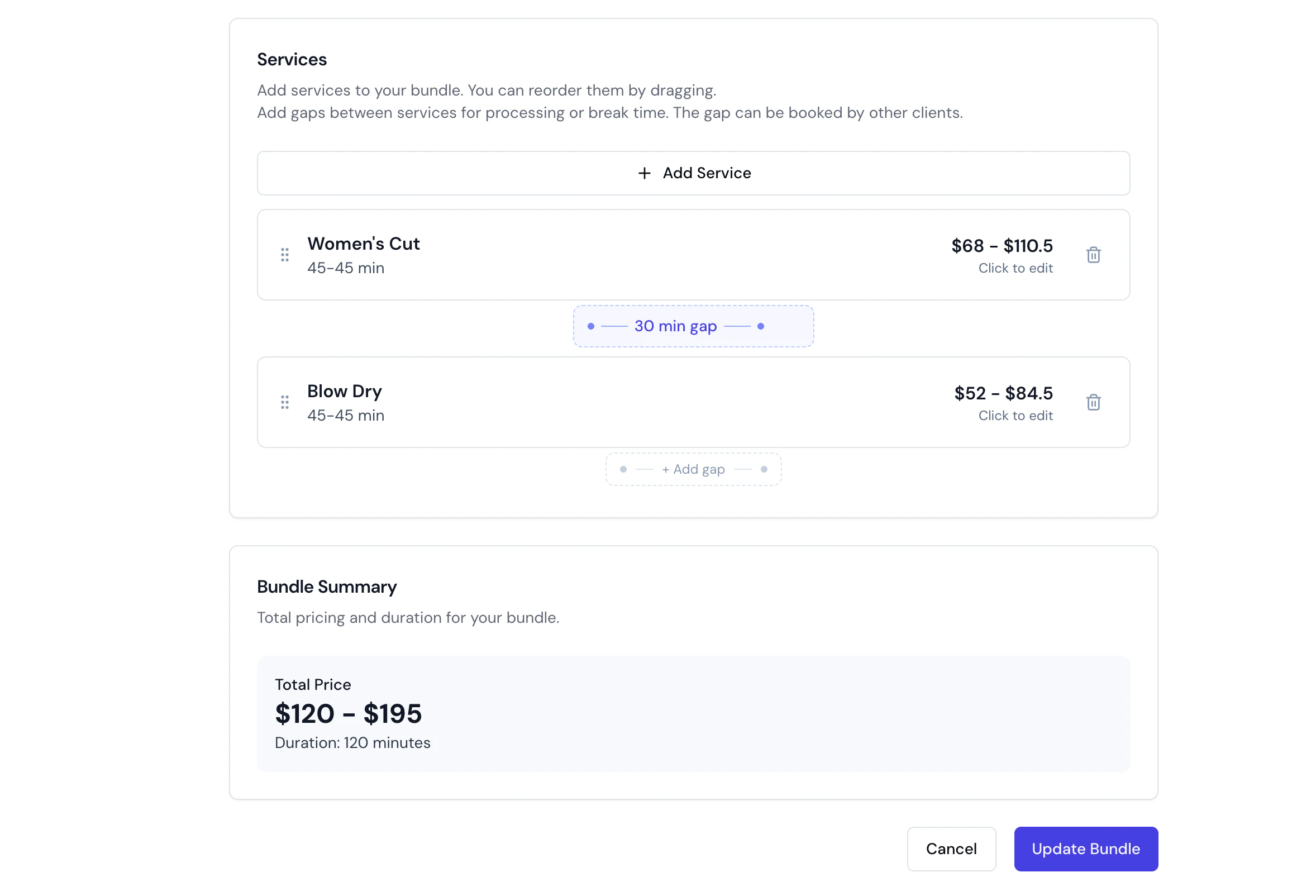
* **Services** (required) — pick the component services; drag to reorder (sequential only).
* **Execution Mode** — **One after another** (sequential, default) or **At the same time** (parallel).
* **Pricing Mode** — [Use service prices / Set total price / % discount / Free](#pricing-modes).
* **Show savings** (on total-price or discount modes) — see [Show savings](#show-savings).
* **Available for online booking** (on by default) — turn off to hide the bundle from your booking page. Independent of the component services' own online-booking toggles.
* **Members only** (off by default) — see [Members-only bundles](#members-only-bundles).
* **Show individual services online** (on by default) — see [Show individual services online](#show-individual-services-online).
4. Click **Create Bundle**.
### Processing and buffer time
* **Processing time** appears **between** components (sequential bundles). Each component's default is applied automatically; click a gap to override it, or the reset icon to restore the default. Processing time is added to the client-facing duration; the team member is free during it. In **parallel** bundles per-component processing times are hidden and the largest one is applied once after the block.
* **Buffer before/after** applies to the **bundle as a whole** — buffer before sits above the first component, buffer after below the last. It blocks the team member for setup/cleanup and is **never shown to clients**. Buffer stays with the first/last **position**, so reordering keeps it at the ends.
### Editing a bundle
Open the bundle and **Edit** to add or remove components, reorder them (sequential only), adjust processing gaps and buffers, change per-component custom pricing, switch the pricing or execution mode, or toggle Show savings / Show individual services / Members only. Changes apply to **new bookings only** — existing appointments keep the details captured at booking time.
### Archiving a bundle
Bundles use the same **archive-first** approach as services — they can't be deleted directly. From the bundle's three-dot menu choose **Archive**, then confirm. The bundle is hidden from the active catalogue and online booking; past appointments booked with it are unaffected. You can't archive a bundle that has active appointments or waitlist entries. To restore or permanently delete, use the status filter on the Service Catalogue page. See [Archiving and restoring](/service-catalog/index#archiving-and-restoring-services-categories--bundles).
***
## FAQs
**Q: What actually happens when a bundle is booked?**
A: It expands into **one appointment line per component service**. Each line carries its own variant, its own pricing tier (from the assigned team member), and its own add-ons, and is tagged with the bundle. See [How a bundle books](#how-a-bundle-books).
**Q: How is a fixed total or % discount split across the components?**
A: **Proportionally**, in proportion to each component's own price, with the **last line absorbing the rounding remainder** so the parts always sum back to the exact total. A % discount is stored as a computed fixed total, so it distributes the same way. See [Pricing modes](#pricing-modes).
**Q: Why does the per-line split matter — I only set one total?**
A: Because packages, memberships and gift cards attach to the **distributed line amounts**, not the headline total. On a fixed-total bundle, the coverage a client gets on any one component reflects that component's distributed share.
**Q: Can a component in a bundle have its own variant and add-ons?**
A: Yes. If a component service uses variants, the client picks one when booking the bundle; if it has add-on groups, the "Customise" step runs for that component. Each is captured on that component's line.
**Q: What's the difference between a parallel bundle and a group booking?**
A: A **parallel bundle** delivers **different** services at the same time, each with its own team member (hair + makeup). A **[group booking](/service-catalog/group-bookings)** delivers the **same** service several times at once, one per guest (two friends both having a facial).
**Q: In a parallel bundle, why does it need different team members?**
A: The components run at the same time, so one person can't do both. Choose "Any available" online and Bella assigns distinct team members. Resource-only components (a sauna, an ice bath) need no team member and are exempt.
**Q: Can a bundle be covered by a prepaid package?**
A: Yes. A package can include the bundle as a line — one session covers all its component lines. A package scoped to a single service instead covers that service's matching component line inside a bundle. See [Packages](/packages).
**Q: Can a membership discount a bundle?**
A: Yes. A membership benefit can be scoped to the bundle (covering the whole thing), or a service-scoped benefit discounts only the matching component line inside the bundle. See [Memberships](/memberships).
**Q: Can I sell a gift card for a bundle?**
A: Yes. A bundle gift card is valued at the bundle's fixed/effective "from" price. Gift cards are dollar instruments — the recipient can spend the value on anything, and an online-drawn gift card is netted at the till so it's never double-charged. See [Gift Cards](/gift-cards).
**Q: Do add-ons get covered by a membership or package?**
A: No. Per-line coverage (membership, package, per-line discount) computes on each component's **base service price** only — add-ons are always client-paid. Add-ons *are* included in order-level discounts and loyalty earn.
**Q: Can a members-only service be hidden inside a bundle to let non-members book it?**
A: No. A bundle is members-gated if the bundle itself is members only **or** if any component service is members only, so a non-member is correctly turned away online. See [Members-only bundles](#members-only-bundles).
**Q: Can I show a bundle online without listing the services inside it?**
A: Yes — turn off **Show individual services online**. Clients see only the bundle name, total price and total duration; your team, scheduler, reports and business-facing notifications still see the full breakdown. See [Show individual services online](#show-individual-services-online).
**Q: Can a bundle mix services from different categories?**
A: Yes — a bundle can include any combination of services across all categories.
**Q: Can I switch a bundle between sequential and parallel later?**
A: Yes. Edit the bundle and change the execution mode. Existing appointments aren't affected — the change applies to new bookings only.
**Q: Can I discount a bundle with a discount code?**
A: Discount codes are scoped to services, not bundles. To reduce a bundle's price use its pricing mode (**Set total price** or **% discount**), or a membership benefit scoped to the bundle.
### When to use a bundle
* **Sell a signature package** — "Signature Spa Day", "Wedding Prep" — as one premium item at one price.
* **Encourage clients to book more** — combine a popular service with a complementary one at a small saving.
* **Reserve two things for one session** — a facial *and* a massage at the same time (each with its own team member), or a sauna *and* an ice bath at the same time (each its own room). A [parallel bundle](#sequential-vs-parallel-execution) is the only way one booking holds two different resources or two team members at once.
* **Run a back-to-back circuit** — several services in sequence, optionally all delivered by the one team member.
A bundle groups **different** services for one client. To book the **same** service for a party — a couples massage, two friends in for facials — use [Group Bookings](/service-catalog/group-bookings) instead (the exception is a *discounted* duo — see [Sequential vs parallel execution](#sequential-vs-parallel-execution)). The two are different tools: a parallel bundle = *different services, same time*; a group booking = *the same service, N times, same time*. For the full map of every multi-person setup, start at **[Bookings for more than one person](/service-catalog/bookings-for-more-than-one-person)**.
***
## How a bundle books
A bundle is a **composition of component services**. At the moment of booking it doesn't stay a single opaque thing under the hood — it **expands into one appointment line per component**, and each line carries its own catalogue detail:
* Each line records its own **variant** (if the component service uses [variants](/service-catalog/variants) — the client picks it during booking).
* Each line resolves its own **pricing tier** from the team member assigned to that line (see [pricing tiers](/pricing-tiers)).
* Each line carries its own **add-ons** (the [add-on](/service-catalog/addons) "Customise" step runs per component service that has add-on groups linked).
* Each line is tagged with the **bundle** it belongs to, so reports, packages, memberships and gift cards can attribute or cover it correctly.
This is why a bundle is more than a saved list: it behaves like several real appointments that happen to be sold and scheduled together.
### An end-to-end flow
Every worked figure below is shown as a plain number in **your business's own currency** — Bella uses your location's currency everywhere, so read `120` as A\$120, £120, €120, or whatever your business trades in.
Take a **"Colour & Style"** bundle with two components — *Hair Colour* (which has a "Short / Medium / Long" variant and a "Bond treatment +`25`" add-on) and *Blow-dry*.
1. The client (or your team) selects the **Colour & Style** bundle.
2. Because *Hair Colour* has variants, the client picks one — say **Long** (`130`, 90 min).
3. The add-on "Customise" step runs for *Hair Colour*; the client adds **Bond treatment** (+`25`, +15 min). *Blow-dry* has no add-ons, so no step appears for it.
4. The booking creates **two appointment lines**, both tagged with the bundle:
| Line | Service | Variant | Add-ons | Tier resolved from | Line price |
| ---- | ----------- | ------- | ------------------ | ----------------------- | ---------- |
| 1 | Hair Colour | Long | Bond treatment +25 | assigned stylist's tier | 130 + 25 |
| 2 | Blow-dry | — | — | assigned stylist's tier | 55 |
5. On the scheduler your team sees two blocks (or one block with the components inside), each with its assigned team member. Everything downstream — the appointment record, checkout, reports, notifications — reads these per-line values.
Add-on prices sit **separately** on their line; add-on **duration** is summed into that line's length. A line's total is the (variant/tier-resolved) service price **plus** its add-ons. Availability accounts for the full duration, including add-ons, on every component line.
***
## Pricing modes
A bundle's price comes from one setting — the **pricing mode**, chosen when you create or edit the bundle. Whichever mode you pick, Bella resolves a price for **every component line**, because that per-line figure is what a package, membership, gift card or discount later attaches to. Understanding how the total is split across the lines is the key to understanding how a bundle interacts with the rest of the catalogue.
### Use service prices (the default)
Each component keeps its own price (or a per-service custom override you set inside the bundle). The bundle total is simply the **sum** of the component lines.
**Worked example.** *Hair Colour* `120` + *Blow-dry* `55` = **`175`**. Each line carries its own price; nothing is redistributed.
Click the price next to any component to set a **custom** price for that component within this bundle — a "custom" badge appears, and the reset icon reverts it to the standard price.
### Set total price (fixed)
You set one fixed total for the whole bundle. Bella then **distributes that total proportionally** across the component lines, in proportion to each component's own price — so each line still carries a sensible, coverage-ready figure rather than the total sitting on one line. **The last line absorbs the rounding remainder** so the line amounts always sum back to the exact total.
**Worked example.** Components priced `120` and `55` (natural total `175`), fixed bundle total set to **`150`**.
* Hair Colour share: 120 ÷ 175 × 150 = `102.857…` → **`102.86`**
* Blow-dry share: the remainder, 150 − 102.86 = **`47.14`** (the last leg absorbs the rounding)
* Lines sum to exactly **`150`**.
The client sees a single **`150`** across every screen; internally each line holds its distributed share.
### Percentage discount
Enter a percentage (e.g. 20% off) and Bella computes the discounted total for you. Under the hood a **% discount is stored as a computed fixed total plus a display-only discount percentage** — so it behaves exactly like *Set total price*: the computed total is distributed proportionally across the lines, last leg taking the rounding remainder. The percentage is kept only to show the saving.
**Worked example.** Components `120` and `55` (total `175`), **20% off** → computed total `140`.
* Hair Colour share: 120 ÷ 175 × 140 = **`96.00`**
* Blow-dry share: remainder 140 − 96.00 = **`44.00`**
* Lines sum to exactly **`140`**; the bundle displays "20% off — you save `35`".
### Free
Every component line is priced at **`0`**. Useful for a promotional or complimentary package.
**Why the per-line split matters.** A prepaid package that covers only the *Blow-dry* service, a membership benefit scoped to *Hair Colour*, or a gift card drawn against the bundle all attach to these **distributed line amounts** — not to the headline total. On a fixed-total or %-discount bundle, the coverage a client receives on any one component reflects that component's *distributed* share, which is why the last-leg rounding rule keeps the maths exact. See [Bundles work everywhere services do](#bundles-work-everywhere-services-do).
### Show savings
On **Set total price** or **% discount**, turn on **Show savings** to display the original (summed) price struck through with a "You save …" message on your online booking page. Savings only appear when the bundle total is above zero — free bundles don't show a saving.
***
## Sequential vs parallel execution
A bundle runs in one of two **execution modes**, chosen when you create or edit it.
### Sequential — one after another
The default. Components run **back-to-back**, and the **same team member can perform every step**. Ideal when one service must finish before the next begins — colour must develop before the cut.
```
●── 10 min buffer before (team member only) ──●
┌─────────────────────────────┐
│ Hair Colour 120 │
│ 90 min — Stylist A │
└─────────────────────────────┘
●── 30 min processing (Stylist A free) ──●
┌─────────────────────────────┐
│ Blow-dry 55 │
│ 45 min — Stylist A │
└─────────────────────────────┘
●── 10 min buffer after (team member only) ──●
Client sees 165 min (90 + 30 + 45); Stylist A blocked 185 min incl. buffers
```
* **Duration** = sum of all component durations + all processing gaps between them.
* **Processing time** between components is client-facing wait time during which the team member is free to serve others (colour developing). Each component's default processing time is applied automatically when you add it, and you can override it per bundle.
* **Buffer before/after** blocks the team member around the whole bundle for setup/cleanup — never shown to the client.
### Parallel — at the same time
Every component starts **simultaneously**. Because one person can't be in two places at once, **each staffed component needs its own team member** — so online you choose "Any available" and Bella assigns **distinct** team members and only offers slots where enough are free at once.
```
┌─────────────────────────────┐
│ Hair Styling 80 │
│ 60 min — Stylist A │
├─────────────────────────────┤
│ Makeup Application 65 │
│ 45 min — Makeup Artist B │
└─────────────────────────────┘
Client sees 60 min (the longest component); two team members at once
```
* **Duration** = the **longest** component (not the sum), plus the largest single processing time applied once after the block.
* **Different services, same time** — a facial *and* a massage together; a sauna *and* an ice bath together.
* **Resource-only components need no team member**, so a sauna + ice bath parallel bundle books with no team members at all — it just reserves both rooms for the slot.
* **Duplicate components are allowed** — and this is exactly how you sell a **discounted duo** of the *same* service. A [group booking](/service-catalog/group-bookings) prices a party **per person × N** (no combined discount, by design), so to advertise a reduced "couples" or "2-for" price you add the service **twice** to a parallel bundle and set a **fixed total** below the natural sum (turn on **Show savings**). If you *don't* want a discount — just the same service for a party at the full per-person price — reach for a [group booking](/service-catalog/group-bookings) instead; it's cleaner. Parallel bundles need at least two components.
**Parallel bundle vs group booking.** A **parallel bundle** = several *different* services delivered at the same time, each with its own team member (hair + makeup). A **[group booking](/service-catalog/group-bookings)** = the *same* service delivered N times at the same time, one per guest (two friends both having a facial). Reach for a parallel bundle when the services differ; reach for a group booking when they're the same service repeated for a party — **unless** you want a combined *discount*, in which case a same-service parallel bundle with a fixed total is the tool (group bookings are always per person). See [Bookings for more than one person](/service-catalog/bookings-for-more-than-one-person#6-bundles).
**To reserve two resources for one session** — a barrel sauna *and* an ice bath — create a resource-only service for each (each requiring **only** its own resource), then combine them in a **parallel bundle**. Both are held for the same slot and the slot is only offered when both are free. If one service also lists the other's resource, Bella may reserve the wrong one — keep each pointed at only its own.
***
## Members-only bundles
You can gate a bundle so **only clients with a covering membership can book it online** — the **Members only** toggle on the bundle form.
A bundle is members-gated if **the bundle itself** is marked members only **or** if **any component service inside it** is members only. Either way a non-member is correctly turned away in online booking with a "members only" message. This gates **online booking** only — your team can still book a members-only bundle for anyone from the dashboard. A covering membership benefit — one scoped to the bundle, or to a component service — satisfies the gate. See [Memberships](/memberships).
***
## Show individual services online
By default online clients see a bundle's full breakdown. The **Show individual services online** toggle lets you present it as a single opaque item instead — useful for a premium "Signature Spa Day" that should read as a package, not a checklist of treatments.
* **On** (default): clients see the bundle name, the "Includes: …" list, per-component durations, add-ons and prices, and per-component rows in the cart, confirmation and "My Appointments".
* **Off**: clients see only the bundle name, total duration and total price — one row on the card, in the cart, at confirmation and in "My Appointments". Client-facing emails and SMS collapse to the bundle name too.
The toggle is **purely presentational for the client**. Internally nothing changes: the scheduler still shows each component block with its team member, the appointment record still stores per-component rows (prices, durations, assignments, add-ons), reports still aggregate by component service, and **business-facing** notifications to your team always show the full breakdown so they know what to deliver.
***
## Bundles work everywhere services do
Because a bundle expands to per-component lines and is itself a first-class item, the rest of the catalogue treats it correctly — scope a feature at the **bundle** from the same picker you'd use for a service.
| It can be… | How it works | More |
| ---------------------------------- | ------------------------------------------------------------------------------------------------------------------------------------------------------------------------------------------------------------------------------------------------------------------------------------- | --------------------------- |
| **Covered by a package** | A prepaid [package](/packages) can include a bundle as a line — **one session covers all the component lines**. A package line scoped to a *service* instead covers that service's **matching component line** inside any bundle. | [Packages](/packages) |
| **Scoped by a membership benefit** | A [membership](/memberships) benefit can be scoped **to the bundle** (discounts the whole thing) — a bundle-only benefit does **not** widen to all services. A benefit scoped to a *service* discounts only the **matching component line** inside the bundle. | [Memberships](/memberships) |
| **Sold as a gift card** | Sell a [gift card](/gift-cards) **for a bundle** — it's valued at the bundle's fixed/effective "from" price. Gift cards are dollar instruments, so the recipient can spend it on anything (including add-ons); an online-drawn gift card is netted at the till, never double-charged. | [Gift Cards](/gift-cards) |
| **Linked to a form** | Attach an intake or consent [form](/forms) to the bundle so it's requested when the bundle is booked. | [Forms](/forms) |
| **Members only** | Gate the whole bundle to members — see [Members-only bundles](#members-only-bundles) above. | — |
**Add-ons and per-line coverage.** Memberships, packages and per-line discounts compute on each line's **base service price** (variant/tier-resolved) — **add-ons are always client-paid** and excluded from that per-line coverage. Add-ons *are* included in order-level discounts and loyalty earn. This keeps the split consistent across services and bundles alike. **Discount codes** are scoped to services, not bundles.
***
## Creating a bundle
1. In the **Service Catalogue**, select the category where the bundle should live.
2. Open the **Actions** dropdown and choose **Add bundle**.
3. Fill in the details:
* **Bundle Name** (required) and **Category** (required).
* **Description** (optional) — explain what's included and why it's worth it.
* **Services** (required) — pick the component services; drag to reorder (sequential only).
* **Execution Mode** — **One after another** (sequential, default) or **At the same time** (parallel).
* **Pricing Mode** — [Use service prices / Set total price / % discount / Free](#pricing-modes).
* **Show savings** (on total-price or discount modes) — see [Show savings](#show-savings).
* **Available for online booking** (on by default) — turn off to hide the bundle from your booking page. Independent of the component services' own online-booking toggles.
* **Members only** (off by default) — see [Members-only bundles](#members-only-bundles).
* **Show individual services online** (on by default) — see [Show individual services online](#show-individual-services-online).
4. Click **Create Bundle**.
### Processing and buffer time
* **Processing time** appears **between** components (sequential bundles). Each component's default is applied automatically; click a gap to override it, or the reset icon to restore the default. Processing time is added to the client-facing duration; the team member is free during it. In **parallel** bundles per-component processing times are hidden and the largest one is applied once after the block.
* **Buffer before/after** applies to the **bundle as a whole** — buffer before sits above the first component, buffer after below the last. It blocks the team member for setup/cleanup and is **never shown to clients**. Buffer stays with the first/last **position**, so reordering keeps it at the ends.
### Editing a bundle
Open the bundle and **Edit** to add or remove components, reorder them (sequential only), adjust processing gaps and buffers, change per-component custom pricing, switch the pricing or execution mode, or toggle Show savings / Show individual services / Members only. Changes apply to **new bookings only** — existing appointments keep the details captured at booking time.
### Archiving a bundle
Bundles use the same **archive-first** approach as services — they can't be deleted directly. From the bundle's three-dot menu choose **Archive**, then confirm. The bundle is hidden from the active catalogue and online booking; past appointments booked with it are unaffected. You can't archive a bundle that has active appointments or waitlist entries. To restore or permanently delete, use the status filter on the Service Catalogue page. See [Archiving and restoring](/service-catalog/index#archiving-and-restoring-services-categories--bundles).
***
## FAQs
**Q: What actually happens when a bundle is booked?**
A: It expands into **one appointment line per component service**. Each line carries its own variant, its own pricing tier (from the assigned team member), and its own add-ons, and is tagged with the bundle. See [How a bundle books](#how-a-bundle-books).
**Q: How is a fixed total or % discount split across the components?**
A: **Proportionally**, in proportion to each component's own price, with the **last line absorbing the rounding remainder** so the parts always sum back to the exact total. A % discount is stored as a computed fixed total, so it distributes the same way. See [Pricing modes](#pricing-modes).
**Q: Why does the per-line split matter — I only set one total?**
A: Because packages, memberships and gift cards attach to the **distributed line amounts**, not the headline total. On a fixed-total bundle, the coverage a client gets on any one component reflects that component's distributed share.
**Q: Can a component in a bundle have its own variant and add-ons?**
A: Yes. If a component service uses variants, the client picks one when booking the bundle; if it has add-on groups, the "Customise" step runs for that component. Each is captured on that component's line.
**Q: What's the difference between a parallel bundle and a group booking?**
A: A **parallel bundle** delivers **different** services at the same time, each with its own team member (hair + makeup). A **[group booking](/service-catalog/group-bookings)** delivers the **same** service several times at once, one per guest (two friends both having a facial).
**Q: In a parallel bundle, why does it need different team members?**
A: The components run at the same time, so one person can't do both. Choose "Any available" online and Bella assigns distinct team members. Resource-only components (a sauna, an ice bath) need no team member and are exempt.
**Q: Can a bundle be covered by a prepaid package?**
A: Yes. A package can include the bundle as a line — one session covers all its component lines. A package scoped to a single service instead covers that service's matching component line inside a bundle. See [Packages](/packages).
**Q: Can a membership discount a bundle?**
A: Yes. A membership benefit can be scoped to the bundle (covering the whole thing), or a service-scoped benefit discounts only the matching component line inside the bundle. See [Memberships](/memberships).
**Q: Can I sell a gift card for a bundle?**
A: Yes. A bundle gift card is valued at the bundle's fixed/effective "from" price. Gift cards are dollar instruments — the recipient can spend the value on anything, and an online-drawn gift card is netted at the till so it's never double-charged. See [Gift Cards](/gift-cards).
**Q: Do add-ons get covered by a membership or package?**
A: No. Per-line coverage (membership, package, per-line discount) computes on each component's **base service price** only — add-ons are always client-paid. Add-ons *are* included in order-level discounts and loyalty earn.
**Q: Can a members-only service be hidden inside a bundle to let non-members book it?**
A: No. A bundle is members-gated if the bundle itself is members only **or** if any component service is members only, so a non-member is correctly turned away online. See [Members-only bundles](#members-only-bundles).
**Q: Can I show a bundle online without listing the services inside it?**
A: Yes — turn off **Show individual services online**. Clients see only the bundle name, total price and total duration; your team, scheduler, reports and business-facing notifications still see the full breakdown. See [Show individual services online](#show-individual-services-online).
**Q: Can a bundle mix services from different categories?**
A: Yes — a bundle can include any combination of services across all categories.
**Q: Can I switch a bundle between sequential and parallel later?**
A: Yes. Edit the bundle and change the execution mode. Existing appointments aren't affected — the change applies to new bookings only.
**Q: Can I discount a bundle with a discount code?**
A: Discount codes are scoped to services, not bundles. To reduce a bundle's price use its pricing mode (**Set total price** or **% discount**), or a membership benefit scoped to the bundle.