> ## Documentation Index
> Fetch the complete documentation index at: https://docs.bellabooking.com/llms.txt
> Use this file to discover all available pages before exploring further.
# Prepaid Package Settings
> Enable prepaid packages and configure default expiry for your location
## Introduction
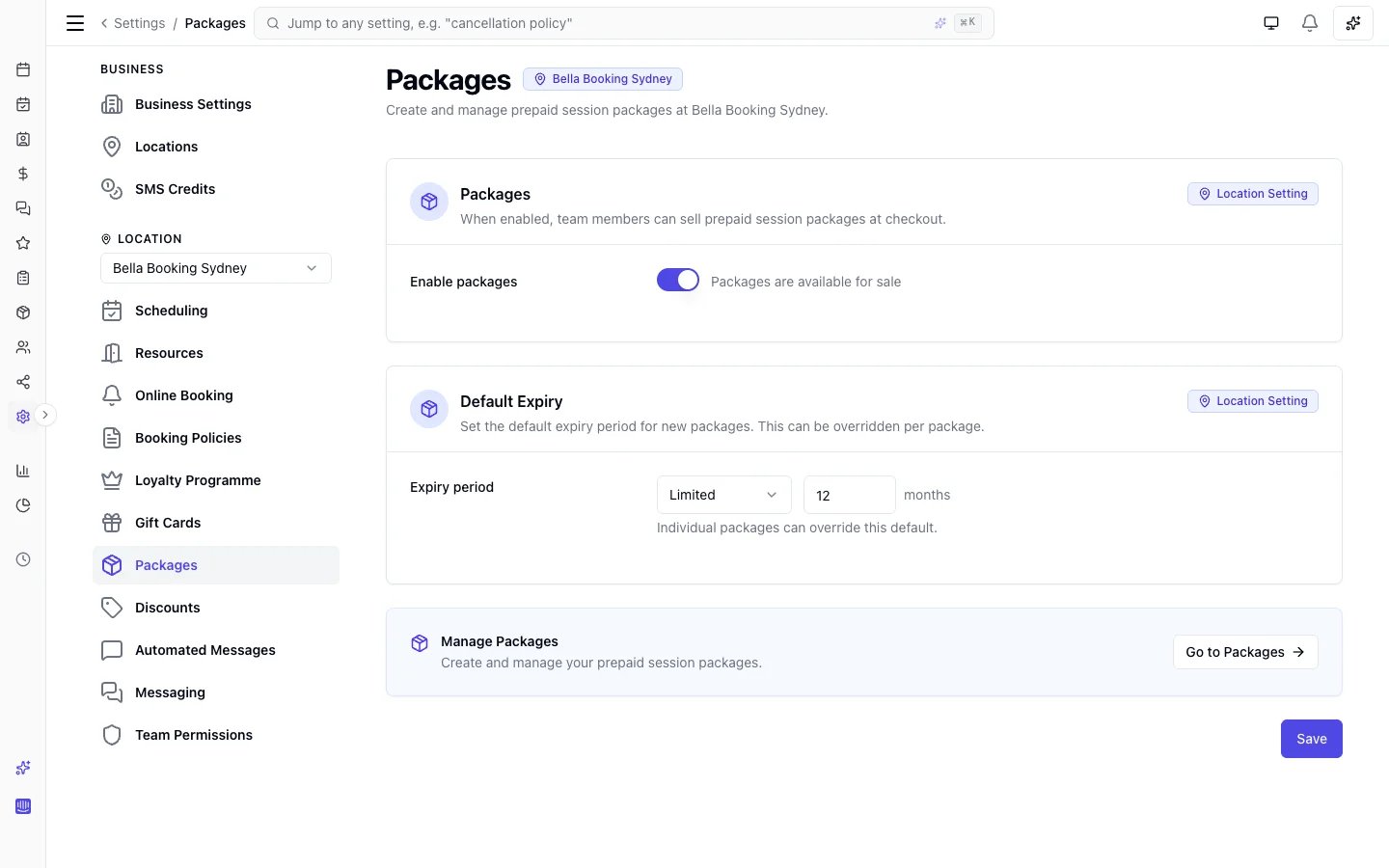
The **Package Settings** page lets you enable the prepaid packages feature for your location and set a default expiry period for new packages. Prepaid packages allow clients to pay upfront for a bundle of sessions at a discounted rate.
 ***
## Accessing Package Settings
1. Go to **Settings** in the sidebar
2. Click **Packages**
***
## Enabling Packages
1. Toggle **Enable Packages** on
2. Click **Save**
When enabled:
* The **Packages** page appears under **Catalogue** in the sidebar
* The **Sold packages** page appears under **Sales** in the sidebar
* The **Add package** button is available in the sales form
* Packages marked **Allow Online Purchase** are visible on the online booking portal
When disabled:
* The sidebar items are hidden
* The packages page shows a disabled state with a link back to settings
* The **Add package** button is hidden from the sales form
* The **Packages** page is hidden from the online booking portal
* Existing sold packages are unaffected — they retain their status and can still be viewed
***
## Default Expiry Period
Set a default expiry period that pre-fills when creating new packages.
1. Enter a number in the **Default expiry (months)** field (e.g., `12` for 1 year)
2. Click **Save**
Leave the field empty if you want new packages to default to no expiry.
This only sets the initial value — you can override the expiry period on each individual package when creating or editing it.
***
## FAQs
**Q: Can I disable packages after selling some?**
A: Yes. Disabling hides the feature from the sidebar and sales form, but existing sold packages retain their status. Active packages can still be redeemed at checkout.
**Q: Does changing the default expiry affect existing packages?**
A: No. The default expiry only pre-fills the form when creating new packages. Existing package definitions and sold packages keep their original expiry settings.
***
To learn how to create, sell, and manage prepaid packages, see [Prepaid Packages](/packages/index).
***
## Accessing Package Settings
1. Go to **Settings** in the sidebar
2. Click **Packages**
***
## Enabling Packages
1. Toggle **Enable Packages** on
2. Click **Save**
When enabled:
* The **Packages** page appears under **Catalogue** in the sidebar
* The **Sold packages** page appears under **Sales** in the sidebar
* The **Add package** button is available in the sales form
* Packages marked **Allow Online Purchase** are visible on the online booking portal
When disabled:
* The sidebar items are hidden
* The packages page shows a disabled state with a link back to settings
* The **Add package** button is hidden from the sales form
* The **Packages** page is hidden from the online booking portal
* Existing sold packages are unaffected — they retain their status and can still be viewed
***
## Default Expiry Period
Set a default expiry period that pre-fills when creating new packages.
1. Enter a number in the **Default expiry (months)** field (e.g., `12` for 1 year)
2. Click **Save**
Leave the field empty if you want new packages to default to no expiry.
This only sets the initial value — you can override the expiry period on each individual package when creating or editing it.
***
## FAQs
**Q: Can I disable packages after selling some?**
A: Yes. Disabling hides the feature from the sidebar and sales form, but existing sold packages retain their status. Active packages can still be redeemed at checkout.
**Q: Does changing the default expiry affect existing packages?**
A: No. The default expiry only pre-fills the form when creating new packages. Existing package definitions and sold packages keep their original expiry settings.
***
To learn how to create, sell, and manage prepaid packages, see [Prepaid Packages](/packages/index).