

Introduction
Two people, two therapists, one booking - that’s a group booking. It lets a client book one service for a small party in a single booking: a couples remedial massage, two friends in together for facials, three of the bridal party in for a blow-dry before the event. One flow, one payment, everyone scheduled at the same start time, and each guest with their own team member. You set the party size range; a party only ever finds a time online when enough qualified team members are free at once. Group bookings are the one-toggle alternative to maintaining a separate “Couple” or “Double” version of a service. A client can book a group themselves online, or your team can build one from the calendar. Either way it’s a single booking for the whole party, so the client never repeats the flow per person and your team sees the group side by side on the scheduler.Two things that sound similar but are different tools:
- A bundle groups different services for one client (a facial and a massage together). A group booking is the same service, repeated for each guest.
- A shared-space booking (People per booking) puts a party on one line in one space, sharing one - or no - provider (a couples float, a group high tea). The booker declares how many people are coming; naming them (linked family members and/or plain guest names) is optional. A private hire (Reserves the whole space) takes the whole room. A group booking instead gives each guest their own team member.
Which do I use? Group vs shared-space vs bundle
Three features let several people book at once. They are alternatives - pick the one that matches how the service is actually delivered. The deciding question is almost always “does each guest need their own team member, or do they share one space?”
In short: each guest their own team member → group booking. Guests share one space on one booking → People per booking. Different services together → parallel bundle.
Group bookings and People per booking can’t both be on for the same service - they’re two ways to handle several people, and the group fan-out already gives each guest their own line. If a service already has People per booking set above 1, Bella asks you to set it back to 1 before you can turn group bookings on.
What you need before you turn it on
Because every guest gets their own team member at the same moment, a group slot only exists when your resourcing can cover the whole party:- The service must be performed by team members. Group bookings give each guest their own team member, so they can’t be switched on for a resource-only service (one with Team member required turned off). For a shared room with one or no provider, use People per booking instead.
- People per booking must be 1. The two features are alternatives - see the note above.
- Reserves the whole space must be off. Private hire holds the entire room for one booking, which is the opposite of a party fanning out to a team member each - so a service can’t have both on. Turn off Reserves the whole space before switching group bookings on.
- Enough qualified team members for the largest party. A party of N needs N team members who are qualified for the service and free at the same time, or no slot appears. If fewer team members are assigned to the service than your maximum party size, Bella warns you when you save - parties above that number will never find a time online.
- (Optional) enough room places. If the service also requires a room, the party shares that space up to its capacity before Bella reaches for another room. A room that seats three takes three of the party first - so a party of four fits two rooms of two. What matters is the total places across the service’s eligible rooms, not whether one room fits everybody; if that total can’t seat the maximum party size, Bella warns you.
Setting up group bookings
- Go to the Services and open the service you want to offer to groups.
- Open the Group bookings tab. (Rooms and equipment have their own Resources tab when resources are enabled for your business.)
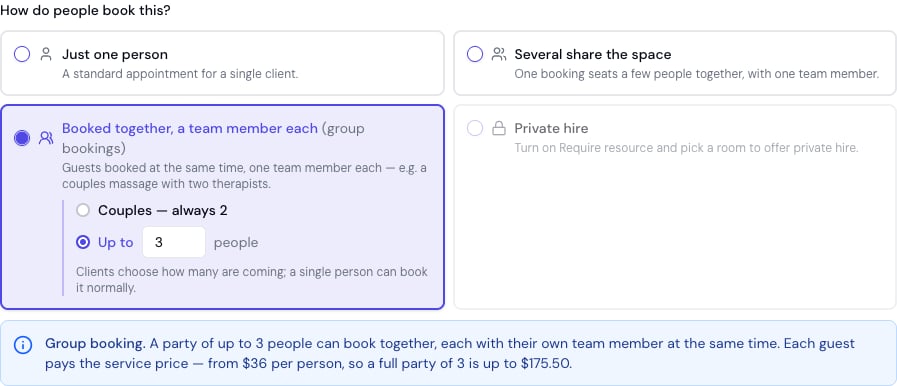
- Turn on Booked together, a team member each - the group bookings toggle. (The “How do people book this?” chooser at the top of the tab sets it too, and offers a one-tap Couples - always 2 option.)
- Set the Party size range - the smallest and largest party that can book online. Leave it at 1 to N for a normal service that groups can also book (a massage that welcomes couples but is fine solo). Set it to 2 to 2 for a dedicated couples treatment - it shows as “Exactly 2 - couples” and can never be booked online for one person, so a single guest can’t accidentally book one therapist at the couples price. There’s no upper limit; a party only ever gets an online time when enough qualified team members are free.
- Check the service’s price is the per-person rate. Each guest’s line is charged the service price, so a price set to a “couples total” would charge a couple double - the live preview on the tab shows what a full party pays.
- Click Save.
A worked example, end to end
Take your regular Remedial Massage - a 60-minute massage you already offer, performed by your therapists. You’d like couples to be able to book it together, without maintaining a separate “Couples Massage” service.1. Turn it on
On the service’s Group bookings tab you switch on Booked together, a team member each (the group bookings toggle) and set Party size to 1 to 2 - solo bookings stay welcome, and couples can now book together. The service already requires a team member and has People per booking of 1, so the toggle is available. You have three qualified massage therapists, so there’s no staffing warning. Save.2. What the client sees online
On your booking page the client taps Remedial Massage and sets How many people? to 2 in the panel that opens. Bella now only offers times when two therapists are free at once:- If Alex and Sam are both free at 2:00 pm, that slot is offered.
- If only Alex is free at 3:00 pm, no 3:00 pm slot appears - a party of two can’t be served by one therapist.
3. What it costs
Pricing is simply per person, added up: each guest’s line carries the price of their own choices. Say the Remedial Massage is priced at 120 per person (shown in your business’s own currency):- Party of two → 120 × 2 = 240, on one booking.
- Add-ons are per guest: if only Guest 2 adds a 10 body butter, the party pays 250.
- The booker pays for the whole party in a single payment - guests don’t pay separately online.
4. What your calendar shows
The one booking appears as two parallel lines at the same start time, each with its own therapist:How clients book a group online
- On your booking page, the client selects the service.
- Tapping the service opens its panel, where a How many people? stepper sets the party size between your minimum and maximum. Below it, each person has their own section (You, or the family member the booking is for, then Guest 2, Guest 3 and so on) with their own variant and add-ons, so one guest can add aromatherapy oil and the other a body butter. Guests can also be given a name (optional). With a minimum of 2+ the stepper starts at the minimum and can’t go below it; when the minimum and maximum are the same (a couples-only treatment) the row says “For 2 people” and the panel skips the stepper, showing both sections straight away.
- Bella shows only the times when enough team members are free for the whole party.
- The client picks a time and checks out - the whole party is scheduled together, each guest with their own auto-assigned team member, paid for in one go by the booker.
Booking a group from your calendar
You don’t have to wait for a client to book online - build a group booking yourself:- Start a new appointment and add the group-enabled service.
- A How many people? stepper appears - set the party size.
- Bella adds a line for each guest at the same start time, each with a different team member. Everything’s editable - swap any team member, open a guest’s line (the pencil) to change that guest’s variant or add-ons, or move the time once to shift the whole party.
- Save. The booking sits under the one client, so a busy front desk never fills in a form per guest.
Pricing and deposits for a party
- Per person, added up. Each guest is a real appointment line carrying the price of their own variant plus their own add-ons, so the party total is the sum of everyone’s lines - when everyone picks the same, that’s the per-person price × the number of guests. Nothing is divided or discounted for booking as a group.
- The booker pays for everyone, in a single payment - online, guests aren’t charged separately.
- Deposits accrue per guest. A deposit set on the service, or a percentage deposit set for your whole business, is worked out for each guest’s line, so a party of N who all book the same owes N times the single-service deposit. A fixed deposit set for your whole business is taken once per booking, however many guests there are. Either way the booker pays it at booking, in one payment.
- Team-member pricing tiers still apply per line. If your business uses pricing tiers (a price that depends on which team member performs the service), each guest’s line is priced from their assigned team member’s tier. Because guests are auto-assigned to different team members, two guests in the same party can land on different tier prices - the party total is the sum of each line’s own tier price, not a flat per-head figure.
Good to know
- Team members are assigned automatically. Each guest is given a different team member who is free at that time, starting with whoever has the fewest bookings that day. Clients never pick a team member for a party.
- Everyone books the same service, each with their own extras. A group booking repeats one service for the whole party, and each guest picks their own variant and add-ons. Guests with different add-on minutes start together and finish at their own time. Booking one guest for a massage and another for a facial in the same party isn’t supported - for two different treatments together, use a parallel bundle instead.
- The party stays together. Because the whole group is one appointment, rescheduling or cancelling moves or cancels everyone together, and self-service changes apply to the whole party - it’s all-or-nothing, not per guest.
- Rooms are shared up to capacity. For a service that also requires a room, the party shares the space up to the room’s capacity - a room that seats three takes three of the party before Bella reaches for another.