

Why this guide exists
Bella ships with a Booking policies reference page that explains what every setting does. This page is different - it covers how to think about your policies as a whole and recommends starting setups for different kinds of businesses. Use this guide first to pick the right shape for your business, then use the reference page to configure each setting. Most people only need the first half; the advanced section below the fold is there when you want to fine-tune. If you’d rather have a conversation, open Ask Bella AI from the sidebar - it can walk you through the same decisions interactively.What policies actually do
Five settings interact to protect your time and revenue:
Each one targets a different failure mode. Reminders catch forgetfulness. Deposits create commitment. Requiring approval catches suspicious or oversized bookings. Cancellation fees recoup lost time. Confirmations weed out clients who silently lost interest.
Pick a starting archetype
Most businesses fit into one of these patterns. Pick the closest one in Settings → Booking policies - you can fine-tune any individual field after.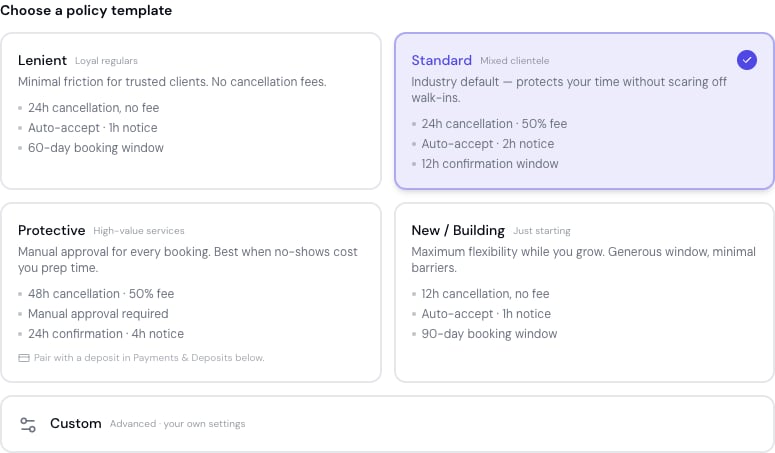
The template picker in Settings → Booking policies. Pick an archetype, review the changes, then adjust any field.
Lenient
For businesses with a loyal, regular clientele and a low no-show history.- Cancellation: 24 hours, no fee
- Deposits: none
- Approval: Auto-confirm
- Confirmation window: off
- Reminders: SMS at 24 hours
- Booking horizon: 60 days
Standard (recommended default)
Mixed clientele, occasional no-shows, no extreme cases either way.- Cancellation: 24 hours, 50% fee
- Deposits: none
- Approval: Auto-confirm
- Confirmation window: 12 hours (for appointments you create)
- Reminders: SMS at 24 hours + 2 hours
- Booking horizon: 60 days
Protective
For high-prep services (colour, balayage, extensions, lashes, med-spa, clinical) where no-shows cost you significant time. The in-app Protective template turns on require approval. If you’d rather gate bookings with a deposit instead, see the two variants below - both are “Protective” in spirit, they just use different gates.- Cancellation: 48 hours, 50% fee
- Confirmation window: 24 hours (for appointments you create)
- Reminders: SMS at 24 hours + 2 hours, with confirmation link
- Booking horizon: 30 days
- Deposits: 50% upfront
- Approval: Auto-confirm - the deposit gates the bookings. Require approval only if you also offer free or zero-deposit services.
- Deposits: none
- Approval: Require approval - every online booking comes to you for review
New / Building volume
For brand-new businesses getting their first clients. Friction is the enemy.- Cancellation: 12 hours, no fee
- Deposits: none
- Approval: Auto-confirm
- Confirmation window: off
- Reminders: SMS at 24 hours
- Booking horizon: 90 days
How deposits and approvals work together
This is the section most owners get confused about, so it’s worth being precise. Deposits and requiring approval cover different bookings. They are NOT alternatives.- When a deposit IS required for a booking → the client pays at booking → payment auto-confirms the appointment. Approval doesn’t apply.
- When a card on file must be CAPTURED for a booking (your policy requires a saved card and the client doesn’t have one yet) → saving the card is what confirms it. Under your location’s Card on file policy there is no appointment until then: the time is held for 30 minutes while the client saves a card, and saving it creates the booking, already confirmed (When a card on file is required). Two bookings are created first instead and confirm as soon as the card is saved: one a service or membership override asks the card for, and one carrying products you take full payment for at booking. Approval doesn’t apply either way - unless the client already has a saved card, in which case there’s nothing to capture and approval (if on) still gates the booking.
- When no payment step applies to a booking → if approval is on, the booking goes to your queue. If approval is off, the booking auto-confirms immediately.
- You take deposits for paid services AND offer free consultations - the deposit gates the paid bookings, approval gates the consultations.
- You override the deposit to zero on specific services (loyalty perks, complimentary touch-ups) - approval gates those.
- A gift card fully covers the deposit on a booking, and Collect at booking is not taking a fee - approval gates it because no payment was taken.
- You haven’t fully connected Stripe yet - deposits are silently waived, so approval is the only active gate until Stripe is connected.
The rule in code:
auto-confirm = (no deposit needed) AND (no card capture needed) AND (no approval required). Any gate alone holds the booking.- If every service you offer requires a deposit, approval becomes redundant - the deposit gates everything. Turn approval off in that case.
- If you have any service that doesn’t take a deposit (free consults, complimentary services, gift-card-covered bookings), keep approval on if you want to gate those.
Online payments - the foundation
Connecting Stripe (online payments) is the single biggest unlock. Without it, several settings silently have no effect:
If you’re seeing no-shows or late cancellations and aren’t on Stripe yet, that’s your single highest-impact change. Connect Stripe →
The full cascade:
- Connect online payments - unlocks deposits, refunds, card-on-file
- Enable deposits on relevant services - reduces no-shows
- Save cards on file at checkout - speeds up future checkout, rebooking from the dashboard, and automatic late-cancel or no-show fee charges
Card-on-file scope: affects your checkout, rebooking, and fee-charging flows. It does NOT change the client-facing online booking flow - that takes payment fresh through Stripe Checkout every time. The speed-up is on your side of the counter.
Cancellation policy - windows and fees
Two settings: cancellation window (the notice period before the cutoff) and cancellation fee percentage (what gets retained from a paid deposit if the client cancels after the cutoff). Choosing the window:- 24 hours is the universal default - what most businesses use, what clients expect.
- 12 hours if your services are quick and your booking flow is high-velocity.
- 48 or 72 hours for high-prep services where same-day cancellation costs you significant time.
- 50% of the deposit for late cancellations is the standard.
- 25% is more lenient but gives weaker incentive.
- 100% maximises revenue protection but can damage relationships if applied without flexibility.
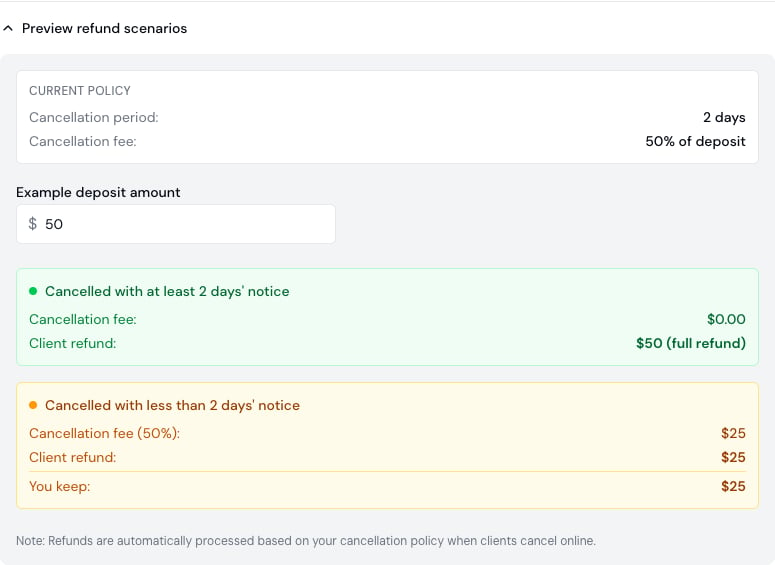
The refund-scenario calculator previews what a client is charged and refunded for any deposit amount under your current policy.
Require approval - when manual review pays off
When approval is on, online bookings arrive for your review rather than auto-confirming. When it’s worth the work:- Specialised services where you need to verify the client (advanced colour corrections, technical services, packages)
- Free consultations or complimentary services where deposit gating doesn’t apply
- Businesses that haven’t connected Stripe yet
- High-value services where 5 minutes of review prevents a much bigger problem
- Solo businesses where you want to know about every booking personally
- Every service requires a deposit - the deposit gates everything, approval is redundant
- High booking volume where reviewing each one creates a queue you can’t keep up with
Confirmation window - for appointments you create
The confirmation window only applies to appointments you create yourself in the Scheduler - not to online bookings. Online bookings auto-confirm on booking (or on deposit payment); someone who books online has already confirmed by booking. An appointment you create on their behalf hasn’t. When to enable:- You frequently create appointments on behalf of clients (phone bookings, walk-in rebookings)
- You want a low-friction filter for likely no-shows - un-confirmed appointments are an early warning
- Clients should re-acknowledge appointments scheduled far in advance
Reminders - the highest-ROI policy
Reminders cost almost nothing, don’t add booking friction, and the data is unambiguous: SMS reminders alone reduce no-shows by around 35% (industry research, 2026). Reminders + deposits drive that below 5%. Recommended cadence:- 24 hours before - gives the client time to reschedule before the cancellation cutoff
- 2 hours before - catches the same-day forgetters
Recommended setups by business profile
Concrete starting configurations.New solo practitioner (first 6 months)
- Cancellation: 12 h, no fee
- Deposits: none
- Approval: Auto-confirm
- Confirmation window: off
- Reminders: SMS at 24 h
- Booking horizon: 90 days
- Goal: friction-free booking while you build a base
Established hair or beauty business, 1 to 3 providers
- Cancellation: 24 h, 50% fee
- Deposits: optional - start without; add 25 to 50% if no-shows climb above 10%
- Approval: Auto-confirm
- Confirmation window: 12 h (appointments you create)
- Reminders: SMS at 24 h + 2 h
- Booking horizon: 60 days
High-end specialist (balayage, extensions, lashes, med-spa, clinic)
- Cancellation: 48 h, 50% fee
- Deposits: 50% upfront, mandatory
- Approval: Auto-confirm for paid services; Require approval if you also offer free consultations
- Confirmation window: 24 h (appointments you create)
- Reminders: SMS at 24 h + 2 h with confirmation link
- Booking horizon: 30 days
Mobile / freelance practitioner
- Cancellation: 24 h, 50% fee
- Deposits: 50% upfront
- Approval: Require approval (verify location and accessibility before confirming)
- Confirmation window: 24 h
- Reminders: SMS at 24 h + 2 h
- Booking horizon: 60 days
Multi-location business
- Defaults at location level; per-service overrides for premium services
- Cancellation: 24 h standard, 48 h on premium services
- Deposits: 25% standard, 50% on premium
- Approval: Auto-confirm
- Reminders: SMS at 24 h + 2 h
Advanced configurations & use cases
The setups above cover most businesses. This section is for fine-tuning - per-service overrides, worked money examples, the settings the archetypes don’t mention, and playbooks for specific situations.Per-service overrides - your most powerful lever
Every policy on the Booking policies page is a location default that any service can override. This is how you run different rules for different services without making the whole booking experience stricter than it needs to be. The 2026 best practice across the industry is selective (hybrid) deposits: apply deposits to the bookings that actually carry no-show risk, and keep everything else frictionless.- By service value/prep: 50% deposit on colour, extensions, and lash sets; no deposit on a A$25 fringe trim or a brow tidy.
- By risk: a longer cancellation window and a deposit on your highest-prep services; lenient defaults everywhere else.
- Free consultations: zero deposit + approval on the consult; deposit on the service that follows.
Multi-service bookings resolve to the most restrictive policy. Minimum notice takes the longest period; cancellation takes the shortest window and the highest fee; a deposit on any one service applies to the booking. See the reference page for the exact resolution rules per setting.
Worked money examples (Australia)
Stripe’s domestic rate in Australia is **1.7% + A200 service with a 50% deposit plays out:
With “pass processing fees to clients” turned on, the client covers the processing fee instead of you: a A103.08**, and you receive the full A$100.
Use-case playbooks
Free consultation, then a paid service
Free consultation, then a paid service
Set the consultation service to no deposit with approval on so you can vet the request. Set the follow-up service (the colour, the treatment) to require a deposit. The deposit gates the paid work; approval gates the free consult. Both run side by side.To stop clients booking the paid treatment online until they have had (or at least booked) the consult, also set a Prerequisite service on the treatment - Completed when the consult must be marked done, Booked when booking both together is enough.
VIP / loyalty exemptions
VIP / loyalty exemptions
Override the deposit to zero on a “VIP” service variant, or simply book trusted regulars yourself from the Scheduler and flip Waive deposit - auto-confirm now on the appointment form. Your deposit policy applies to team-created bookings too, but the create form lets you waive it - or type a smaller amount - for that one booking (see adjusting the deposit on one appointment). Keep approval on if you want those zero-deposit bookings to still pass through your queue.
Gift-card-covered bookings
Gift-card-covered bookings
When a gift card fully covers the deposit and Collect at booking is not taking a fee, no card payment is taken - so the booking won’t auto-confirm on payment. Keep approval on if you want to gate these, or let them auto-confirm if you trust gift-card holders.
Group, event, or bridal bookings
Group, event, or bridal bookings
Use a longer booking horizon (up to 365 days), a 48 h+ cancellation window, and a larger deposit on the relevant service. Because these are per-service, your everyday bookings stay on the lighter default.
Walk-in / express services
Walk-in / express services
0-minute minimum notice so same-day slots are bookable, no deposit, show all time slots, and waitlist on to capture overflow. Friction is the enemy for impulse bookings.
Seasonal peaks (festive, wedding season)
Seasonal peaks (festive, wedding season)
Tighten during peak - add or raise deposits and lengthen the cancellation window on in-demand services - then relax afterwards. Per-service overrides make this a few edits rather than a policy overhaul.
Tuning the settings the archetypes don’t mention
Diagnose by symptom
Built-in tools
- Availability - Settings → Booking policies. This block always shows how many times clients can book over the next 7 days and the next 14 days under your saved policies, worked out against your real calendar. Change the time slot interval, schedule gaps, minimum notice or booking window and each window shows what its figure would become - so you can test a policy change against your own numbers before you save it, not after. The fortnight matters: when you’re full for the coming week, it’s the number that tells you whether clients can still book you at all.
- Refund-scenario calculator - Settings → Booking policies → Preview refund scenarios. Shows what a client is charged and refunded for any deposit amount.
- Fee calculator - on the Payments & deposits card. Shows the exact Stripe + Bella split for any amount, and what changes when you pass fees to clients.
- Booking-page readiness - when you share your booking page, Bella flags policy gaps (e.g. “deposit required but Stripe not connected”, “long booking window with no cancellation policy”) so you can fix them before going live.
- Ask Bella AI - from the sidebar, to talk any of these decisions through against your own data.
Revisit your policies
Every 3 to 6 months, or whenever your no-show rate changes meaningfully. The dashboard digest surfaces signal-driven recommendations as your data accumulates - when one appears, ask Bella AI to talk through the specific change.See also
- Reduce No-Shows guide - focused strategies on no-show prevention
- Online booking Setup guide - broader setup walkthrough
- Booking policies reference - what every setting does
- Payments settings - connect Stripe Connect
- Automated messages settings - configure reminders