

Introduction
The Messaging settings page is where you manage your Messages Plus subscription, dedicated phone number, email reply handling, and SMS credits. Messages Plus is the marketing and retention add-on: the two-way inbox on your own business number, SMS and email campaigns, the automated birthday and new-client programmes, and the two follow-up messages after an appointment. The appointment lifecycle is on every plan without it, so confirmations, reminders, reschedules, cancellations, payment requests, receipts and rebook reminders keep sending whether you subscribe or not. Your dedicated phone number is what unlocks the inbox and carries the SMS; sending email costs no SMS credits and needs no verification. Where we can’t provision a number yet, email campaigns, the automated offers and the follow-up messages by email are the parts you can use - see Countries where dedicated numbers aren’t available yet. To access these settings, go to Settings → Messaging. Access: The Manage messaging settings permission opens this page (Owners and Admins have it by default). Purchasing SMS credits and auto-top-up need the Manage billing permission (Owners have it by default). Starting or stopping Messages Plus needs both.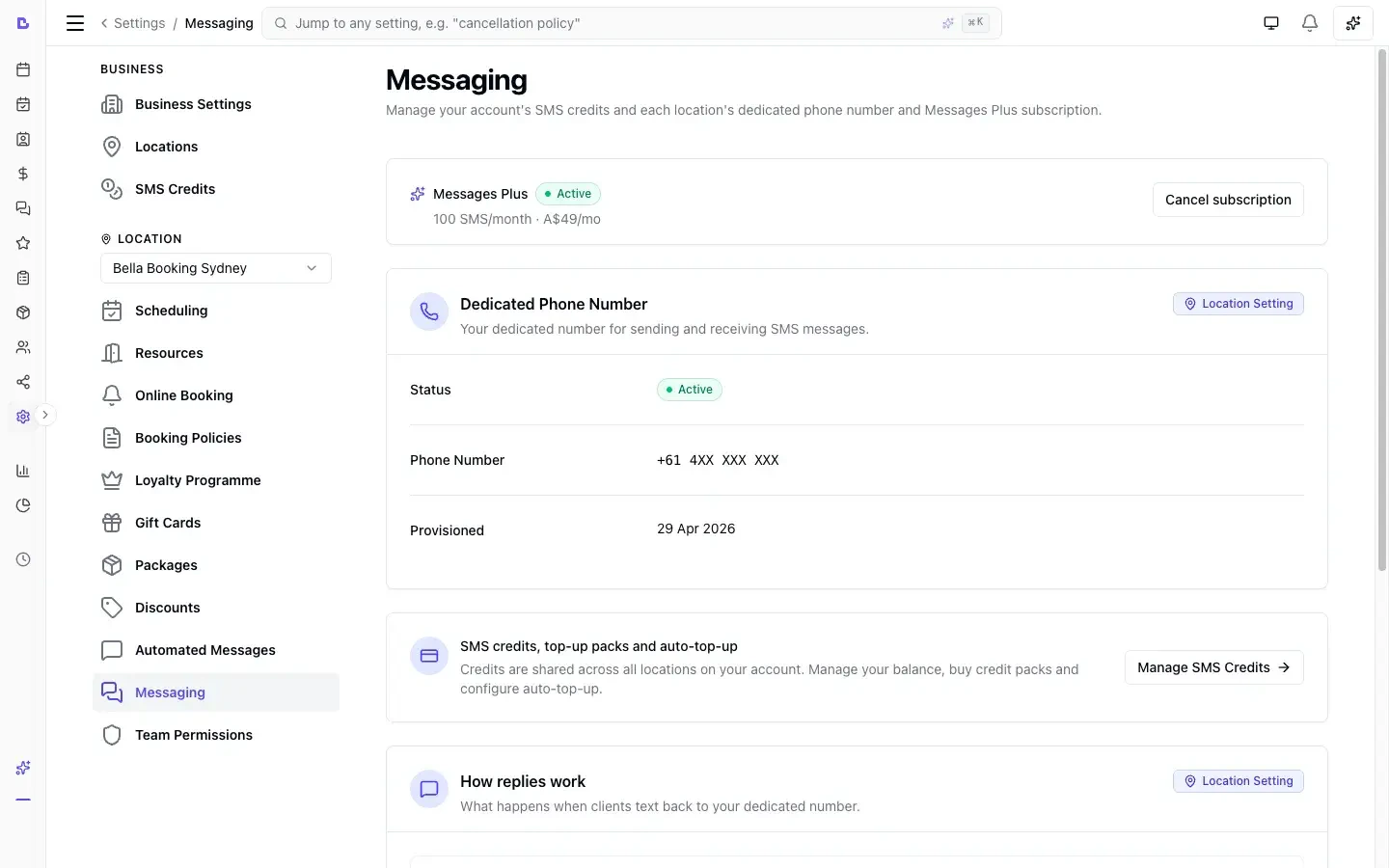
Messages Plus Subscription
Messages Plus is a monthly add-on subscription, charged per location on top of any paid plan. It is the marketing and retention half of Bella’s messaging: everything below exists to bring a client back or spend more. It includes:- A dedicated phone number for your business - a local mobile number in most countries, or a toll-free number in the United States and Canada. It carries your SMS and unlocks the shared inbox below
- A two-way inbox for sending and receiving both SMS and email messages
- Two-way email messaging - email a client and have their reply land back in the same conversation, with no dedicated number required to SEND (the shared inbox itself still needs a live number - see below)
- Extra monthly SMS credits, added on each renewal on top of the allowance your plan already includes
- Unlimited email campaigns (fair use) - branded marketing and announcement emails with no per-send cost; design them in Bella’s editor with images, your logo and brand colours, or paste your own HTML or a Canva Email design. See Email & SMS Campaigns
- SMS campaigns to many clients at once, using your credits
- Automated birthday and new-client offers - birthday greetings and rewards, plus the new-client offer and its welcome message, send automatically (configured under Programmes)
- The follow-up messages - your own aftercare, check-in or thank-you note, sent automatically after an appointment ends, for the services you choose. There are two, each with its own delay: First follow-up out to 14 days, Second follow-up out to 365 days
- Threaded conversations integrated with your client records
Countries where dedicated numbers aren’t available yet
We can’t provision a business number in every country. Where we can’t, Messages Plus still works - just the email half of it:
Bella tells you which applies to you: if a dedicated number isn’t available in your country, the Messaging settings page says so instead of offering the number setup, and the Messages Plus page only advertises what you can actually use.
Subscribing
- Go to Settings → Messaging
- Click Subscribe to Messages Plus
- Complete payment through Stripe
- Your subscription activates immediately - you will be redirected back to the settings page
Cancelling
- Go to Settings → Messaging
- Click Cancel Subscription
- Confirm the cancellation in the dialog
Changed your mind? You can resume your subscription at any time before the billing period ends by clicking Keep Subscription on the settings page.
Payment Issues
If a payment fails, your subscription enters a payment failed state. While in this state:- Campaigns, email messaging, the automated birthday and new-client offers, and the follow-up messages stop
- Replying by SMS from your inbox keeps working, while you have an active number and credits
- Your monthly Messages Plus credits aren’t added until payment succeeds
- Inbound messages are still received
- A banner appears with a link to update your payment method in the Stripe billing portal
Email Messaging
With Messages Plus active, you can send a client an email straight from the Messages inbox - and their reply threads back into the same conversation, right alongside any SMS. Email sending needs no dedicated phone number. The shared inbox you read and reply from does still need a live number, so in a country where we can’t provision one yet, email campaigns, the automated offers and the follow-up messages by email are the parts you can use. To email a client, open a conversation (or start a new message), choose the Email channel, add a subject, and send. The Email option appears whenever the client has an email address on file that hasn’t bounced.Forward email replies to your business email
By default, a client’s email reply appears only in your Messages inbox. Turn on Forward email replies to also receive a copy in your own business email, so you can keep an eye on replies from your normal inbox.- Go to Settings → Messaging
- Find the Forward email replies card
- Toggle Also send replies to my business email on
The forwarded copy goes to the business email set in your Business settings. Make sure that address is correct so replies reach you.
When a client replies no to a reminder
Once your dedicated number is active, the How replies work card on this page explains what a client’s text reply to a reminder does, and holds one choice: what a no (No, N, Cancel) does to the appointment.
- Go to Settings → Messaging
- Find the How replies work card
- Under When a client replies no to a reminder, pick one:
- Flag it for follow-up (the default). The reminder is marked Declined - needs follow-up in Messages and you get a notification. The appointment stays as it is until you act.
- Cancel the appointment. Bella cancels it for the client the same way they would from their booking page: your self-cancel and notice-period rules still apply (a deposit follows your cancellation policy), your Cancelled appointment message goes out on the channels you have on for it, and you get the cancellation notification. If your rules don’t allow the client to cancel, the reply is flagged for follow-up instead and the notification says why.
Dedicated Phone Number
Each location gets its own dedicated phone number. This is the number your clients see when they receive messages from your business, and the number they reply to. Messaging regulations require a one-time verification of your business with our messaging provider before your number can send freely - see Verifying your business for the full walkthrough. The order depends on your country:- Where we can’t provision a number yet - this section doesn’t apply to you: there’s no number to set up and nothing to verify. See Countries where dedicated numbers aren’t available yet.
- Most countries (e.g. Australia, United Kingdom, Sweden) - you verify your business first, then provision your number.
- United States and Canada - these use a toll-free number rather than a mobile number, so the order inverts: your number is purchased automatically as part of verification. Your messages send from a shared number while carrier review completes (usually a few business days), then switch over automatically once approved - there’s no separate “Provision number” step.
Provisioning a Number
Most countries:- Go to Settings → Messaging
- Verify your business if you haven’t already
- Click Provision number - a number is assigned automatically, usually within a minute
Releasing a Number
Your dedicated number is automatically released when your Messages Plus subscription ends. You do not need to release it manually.SMS Credits
Your plan includes an SMS allowance that resets every month, on the same day of the month as your billing date. When this runs out, messages draw from your additional credits pool: purchased credit packs and Messages Plus renewal credits. Credits apply to SMS only. Email campaigns are unlimited within Messages Plus and never consume credits. Credits are managed on the SMS credits page: go to Settings → SMS credits, or from Settings → Messaging click Manage SMS credits (credits are shared across all locations on your account). Buying packs and changing auto-top-up needs the Manage billing permission.How credits are counted
One credit covers one SMS segment. A segment is about 160 characters, or about 70 with emoji. Longer messages split into extra segments and use one credit per extra segment, so a 350-character text uses 3 credits. The message composer shows you exactly how many segments and credits a message will use before you send it, so there are no surprises. To keep costs down, keep messages short and avoid emoji where you can. For the full character rules, the exact characters that switch a message to the expensive encoding, and worked examples, see How SMS credits are counted.How SMS consumption works
- Plan allowance - your monthly SMS allocation (resets on the same day every month)
- Additional credits - purchased credit packs + Messages Plus renewal credits (never expire, roll over)
- Auto-top-up - if enabled, automatically purchases a credit pack when both pools are empty
Purchasing credit packs
Credit packs are available on paid plans only; during the trial you have the trial’s own SMS allowance and can’t buy packs.- Go to Settings → SMS credits
- Choose a credit pack size - pricing is shown on each pack
- Complete payment through Stripe - credits are added to your account immediately
Auto-top-up
Auto-top-up ensures your business never runs out of SMS credits. When enabled, Bella Booking automatically charges your saved payment method for your selected credit pack size whenever both your monthly allowance and additional credits are exhausted. To configure auto-top-up:- Go to Settings → SMS credits
- Toggle Auto-top-up on
- Select your preferred credit pack size
Auto-top-up requires a saved payment method. If the charge fails, SMS sending pauses until you manually purchase credits or update your payment method.
Checking your balance
The SMS credits page shows your current balance, including:- Total credits available
- Monthly allowance used and when it resets
- Purchased credits remaining
- Auto-top-up status and recent credit transactions